Low Cost SLA Printer For Home Use?
Is it possible for a low-cost SLA printer to produce results that resemble those created by a professional at home? Of course. Most low-cost SLA printer products on today's market are actually LCD (Masked Stereolithography) systems rather than traditional laser-scanning SLA machines. These desktop resin printers use LCD masking technology to make high-resolution photopolymer 3D printing more accessible to home users, designers, dental labs, and small businesses. Industrial laser-galvanometer systems cost more than $50,000, but units that cost between $200 and $5,000 can achieve layer heights ranging from 10 to 50 microns. They get rid of hurdles like high capital costs that stop small businesses, independent engineers, and design companies from making cosmetic samples, dental models, jewelry patterns, and precise mechanical parts right from their workbench.
Understanding Low-Cost SLA Printers: What They Are and How They Work?
Find out what low-cost SLA printers are and how they work.
One of the oldest and most accurate types of additive manufacturing is stereolithography. A low-cost SLA printer works by fixing liquid photopolymer resin one layer at a time with a UV light source, usually one with a wavelength of 405 nm. The main difference between industrial systems and lower-cost desktop versions is the way UV light is projected onto the resin surface.
Core Technology Behind Affordable Stereolithography
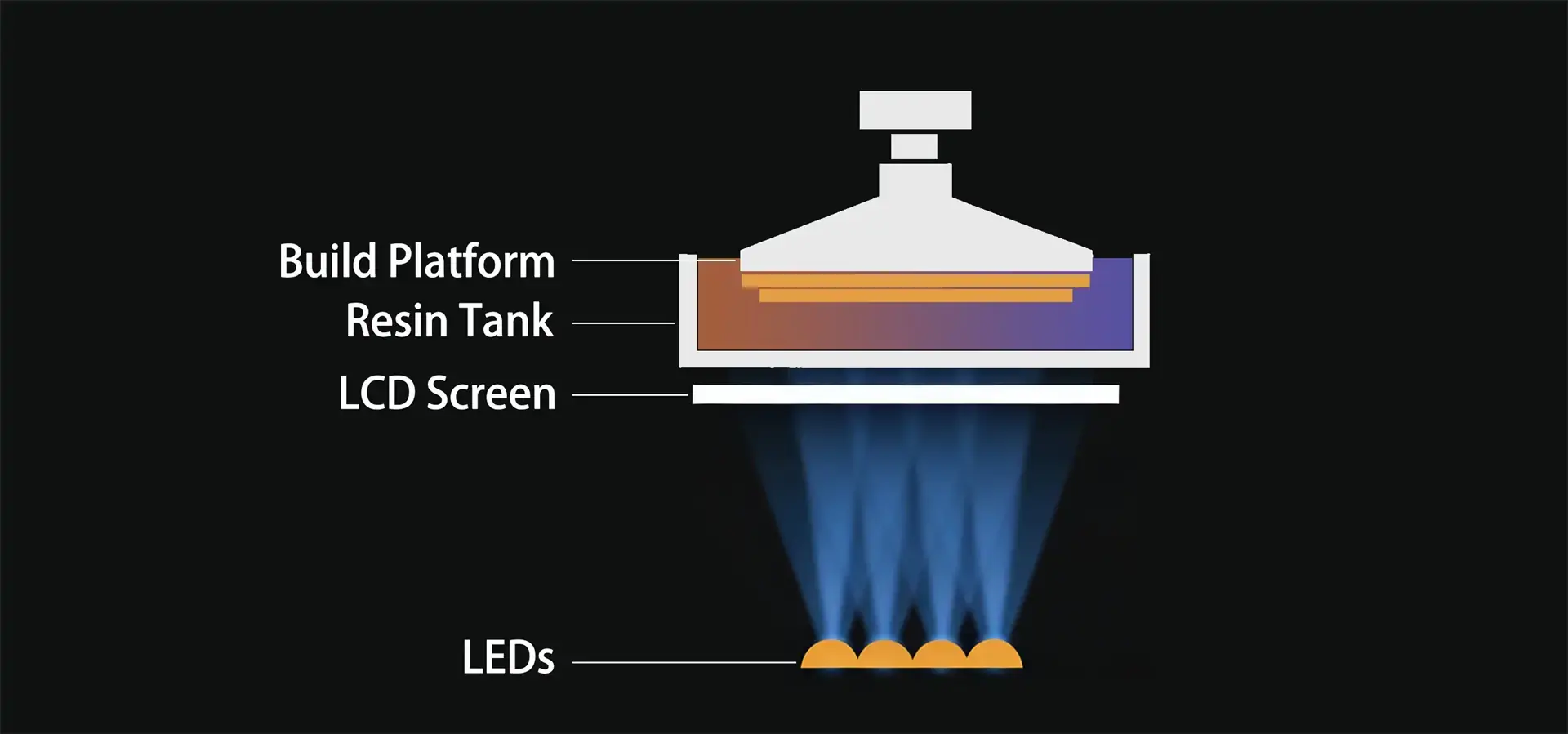
Traditional industrial SLA systems employ laser-galvanometer units to trace lines point by point across the resin surface. On the other hand, a low-cost SLA printer uses a monochrome LCD screen beneath the resin vat as a digital photomask. When UV LEDs are turned on from below, the LCD carefully stops or lets light through, curing an entire layer simultaneously. Compared to laser-scanning systems, this parallel exposure method simplifies the mechanics and significantly reduces hardware complexity and manufacturing costs compared to industrial laser-scanning systems. Modern machines have screens with 8K to 16K resolution and XY pixel resolutions typically ranging from 19 to 50 microns, which is fine for dental labs and metal casting houses that need to reproduce fine surface details and complex geometries.
After each layer cures, the Z-axis device lifts the build platform a small amount at a time, usually every 10 to 100 microns. Precision dual linear rails help reduce Z-axis wobble, which makes sure that all layers are registered correctly across tall prints. Chip-on-Board (COB) LED grids and Fresnel lens systems help improve light uniformity across the build area. This stops edge-fade problems, which happen when prints around the edges fail because they don't get enough exposure.
Operational Principles and Print Workflow
A simple process is used to operate a low-cost SLA printer device. Users create 3D models in CAD software and then use slicing tools to cut them into horizontal cross-sections. These programs automatically generate support structures for overhangs and unsupported geometries during printing, figure out exposure times based on the properties of the resin, and find the best layer thickness to balance speed and surface quality. The printer starts the automatic curing cycle as soon as the cut file is sent via USB or Wi-Fi. UV light is needed for 2 to 10 seconds for each layer, based on the resin formulation and selected layer thickness. When the job is done, the printed part is taken off, and the object is post-cured under more UV light to improve its mechanical properties. This is done by washing away the uncured resin with isopropyl alcohol or water-washable solutions. This process generally produces parts with more uniform mechanical properties compared to FDM prints. This is different from fused deposition modeling (FDM) prints, which can exhibit weaker interlayer bonding along the Z-axis under certain loading conditions.
Benefits and Best Applications of Low-Cost SLA Printers for Home Use
The widespread availability of stereolithography technology has created amazing opportunities for professionals who don't work in standard factories. A low-cost SLA printer can deliver professional-level surface detail and fine feature resolution at a significantly lower cost than industrial systems, so you can use it for small-scale production and other unique tasks.
Key Advantages Driving Adoption
When compared to filament-based options, desktop stereolithography systems offer better print accuracy and produce parts with surface finishes that need less post-processing. When the plastic is fully hardened, it has smooth surfaces right off the build plate. This significantly reduces visible layer lines compared to many FDM prints. This quality edge saves engineers time during product development stages because they don't have to do as much sanding or finishing work to check the shape, fit, and assembly.
Even if they are used all the time, operating costs stay affordable. Photopolymer resins usually cost between $25 and $80 per liter, and normal prints only need small amounts because slicing software allows for hollow-shell improvements. Consumables like FEP release films need to be replaced every 20 to 50 print runs, which means that upkeep costs are always the same. Most desktop units use less than 100 watts of power when they're running, which is about the same as a laptop computer.
Modern budget units have easy-to-use displays that get rid of technology problems. With touchscreen controls, auto-leveling build plates, and resin level monitors, tasks that used to need special training can now be done automatically. Cloud-connected models let users keep an eye on things from afar using apps on their smartphones. This way, users can see how the printing is going and get failure notifications without having to be there in person. Because it's easy to use, the technology can be used in home offices, classes for new businesses, and schools.
Real-World Applications Across Industries
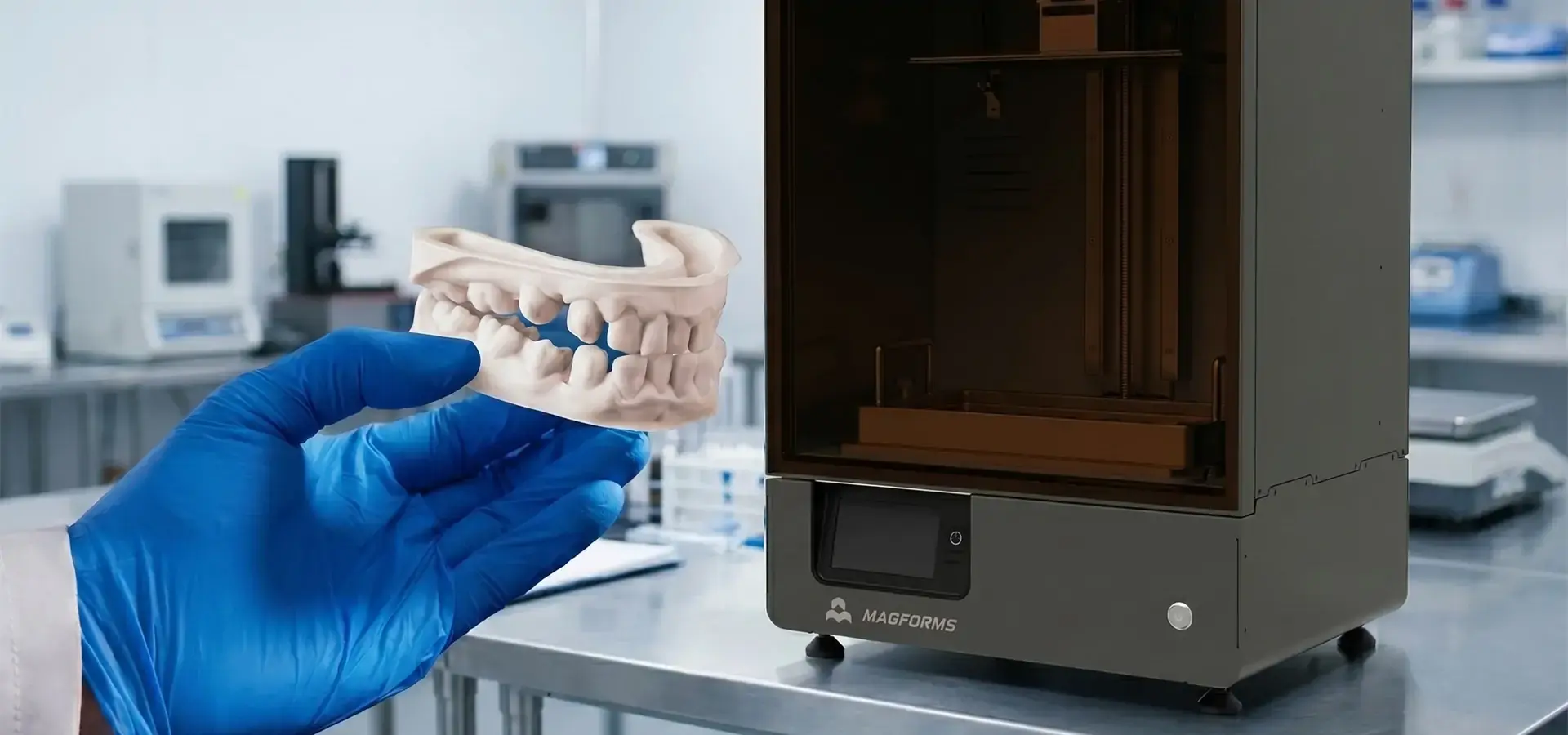
One of the best uses for digital technology is in dentistry. Stereolithography is a low-cost SLA printer method that dental labs use to make orthodontic study models, surgery drilling guides, and temporary crown patterns. The accuracy of 25–50 microns ensures that clear aligner thermoforming routines work properly, replacing old-fashioned plaster impression methods with fully digital ones. Within hours, clinics can make surgical models that are special to each patient. This can help accelerate treatment planning workflows in digital dental environments, which improves patient results while lowering the cost of outsourcing to a lab.
Casting shops and jewelry makers use castable photopolymer resins that are made to burn out cleanly during investment casting. With a low-cost SLA printer, artists can make complex master patterns with shapes that can't be made by CNC cutting or hand carving. These shapes include delicate lattice structures, organic textures, and undercut features that would normally need multiple models to be made. Properly processed castings can retain fine surface details suitable for jewelry and precision casting applications, right down to the ridges on each fingerprint. This meets the needs of upscale markets that want unique designs.
Desktop stereolithography is used for rapid prototyping by product development teams in consumer gadgets, car parts, and industrial equipment. During design reviews, engineers make "look-and-feel" proof models to check for usability and good looks. The relatively uniform material properties of cured resin parts are useful for evaluating mechanical assemblies because it lets you test how well snap-fit joints, threaded connections, and sealing surfaces work. Being able to make changes to plans within 24 to 48 hours speeds up the time it takes to bring a new product to market, giving companies in fast-moving industries an edge.
Cultural creative companies use the technology to make customized figurines, limited-edition collectibles, and scale models. Developers of shoes print shoe models and prototypes for accessories. This turns digital ideas into real samples that buyers can touch at trade shows. These different uses show how stereolithography has changed fields other than standard manufacturing by making it easier to access.
How to Choose the Best Low-Cost SLA Printer for Your Needs?
To choose the right tools, you need to carefully look at the technical specs, the needs of the operation, and the supplier's skills. Procurement managers and technical directors have to find a mix between performance standards and budget limits while also making sure that the system will work reliably in the long run.
Essential Evaluation Criteria
Print quality is still the most important thing to think about. There are two ways to measure resolution: the XY resolution is based on the size of the pixels on the LCD screen, and the Z-axis resolution is based on the thickness of the layers. Units with an XY resolution of 30 microns and 10-micron layer steps are good for dental and jewelry work that needs fine detail. For fit-checking, mechanical prototyping can work with 50-micron XY precision and 50-micron layers, with speed being more important than surface texture.
The largest part size is determined by the build volume. The most common build volumes for low-cost SLA printer models are 120x68x150mm to 192x120x245mm. Platforms that are bigger can make a lot of small parts at once or one big part, like the trim pieces inside cars. But a higher build volume usually means longer exposure times per layer and higher costs for consumables. This is why buyers should match capacity to real production needs instead of trying to meet all the standards that can be met.
When an application calls for it, material suitability is very important. Open-system printers can use photopolymer formulas from other companies, which lowers the cost of resin by 30–50% per liter compared to private materials. When engineers are making samples, they might need special mixes, like ABS-like resins that can take impact, flexible materials that look like rubber, high-temperature versions that can handle 120°C+ heat, or biocompatible grades that are approved for short-term contact with medical devices. Closed-system machines only work with resins that have been approved by the maker. This limits testing but makes sure that the material and tools are compatible.
The ease of use of software affects daily work. Easy-to-use slicing programs with pre-set profiles cut down on setup time. For more experienced users, manual parameter control lets them find the best exposure settings based on real-world tests. Wi-Fi connection and the ability to watch from afar make process management flexible. This is especially helpful for batch production situations where several prints run overnight.
Supplier Reliability and Support Infrastructure
Long-term satisfaction is greatly affected by the level of technical help. Respondent customer service teams that can figure out problems over email, the phone, or video chat cut down on downtime when fixing print errors or hardware problems. A 12- to 24-month warranty guards against problems with the way the product was made, and extended service plans give peace of mind to production settings that need it the most.
Pay attention to the lead times for new parts that are used up quickly. Normal use wears down FEP films, resin tanks, LCD screens, and LED grids. When suppliers have regional delivery centers, they can send replacements within two to five business days. Fulfillment from overseas may take three to six weeks, which is too long for companies that need to keep producing things. By making bulk purchases with your favorite sellers, you can be sure of stable costs for consumables and better distribution of inventory.
Comparing Leading Budget Models
Feedback from users gives us important information about how reliable something is in the real world. Online communities like boards, social media pages, and review sites show how things usually break, how to fix them, and how often they should be serviced. Machines with busy user groups can use crowdsourced knowledge bases to add to official paperwork. This speeds up the process of fixing technical problems when they happen.
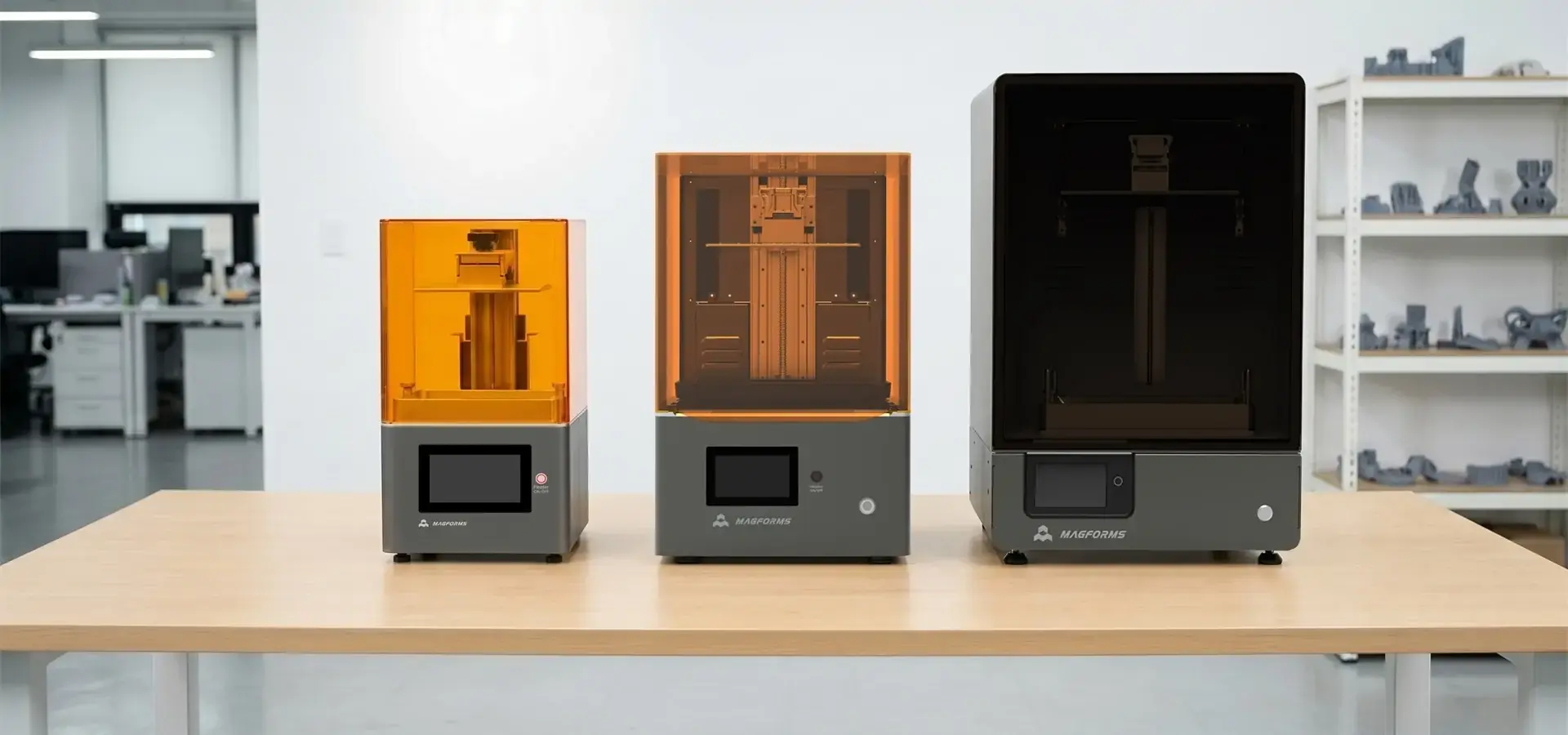
Entry-level units that cost less than $500 are aimed at hobbyists and school users. They have smaller build volumes of about 120x68x150mm, screens with 4K resolution, and simple touchscreen controls. The print speeds on these machines are only typical vertical print speeds of approximately 20 to 30 mm per hour depending on resin and layer settings, but the results are good enough for models, jewelry samples, and small mechanical parts.
Mid-range systems that cost between $800 and $2,000 have 4K LCD screens, bigger 192x120x200mm build frames, and Wi-Fi connections. The monochrome screens let more light through and last longer—more than 2,000 hours—than the RGB screens, which need to be replaced every 500 to 800 hours. These units are good for small businesses that need to balance performance and cost. They can produce professional-quality work for dental labs, product design companies, and jewelry workshops.
Some high-end types that cost around $3,000 to $5,000 have 8K screens, COB LED panels with advanced optical systems, some systems may include active resin heating for temperature-controlled curing, and industrial-grade linear rails. These systems are made for established engineering and service teams that need the highest throughput and dependability for batch production processes. Depending on layer settings, resin type, and model geometry, some advanced desktop systems can achieve vertical print speeds of 50 to 80 mm per hour, and the improved mechanical steadiness keeps the dimensions correct after hundreds of print cycles in a row.
Before buying tools, procurement teams should ask for model parts that are printed on materials that are right for the job. Checking the quality of the real output, using calipers to make sure measurements are correct, and destructive tests to check mechanical features, verifies what the maker says and makes sure it meets production needs.
Maintenance Tips and Long-Term Performance Optimization
Regular repair practices keep tools working well and extend their life. Because they are easier to use and have consumer-grade parts, desktop stereolithography systems need to be tended to more often than industrial units. However, low-cost SLA printer maintenance can keep them from breaking down too soon.
Resin Handling and Storage Protocols
When exposed to light and changes in temperature, photopolymer plastics break down. Chemical stability can be maintained for 6 to 12 months after the date of manufacture by keeping empty bottles in cool, dark places. Once resins are opened, they should stay in the low-cost SLA printer's protected vat or be moved to clear containers between print sessions. Letting resin sit in room light for a while causes some of it to cure, which creates sediment that gets into other prints and makes them dirty.
Filtering the resin after each print process gets rid of support material and pieces that have hardened. Paint strainers with a 190-micron size catch dirt and dust but let liquid resin flow through without any problems. By doing this easy thing, you can keep prints from failing because flying particles block UV light from getting through the FEP film. Mixing the resin before dumping it into the vat makes sure that the pigments are spread out evenly. This is especially important for opaque mixtures that separate when they are stored.
Calibration and Mechanical Adjustments
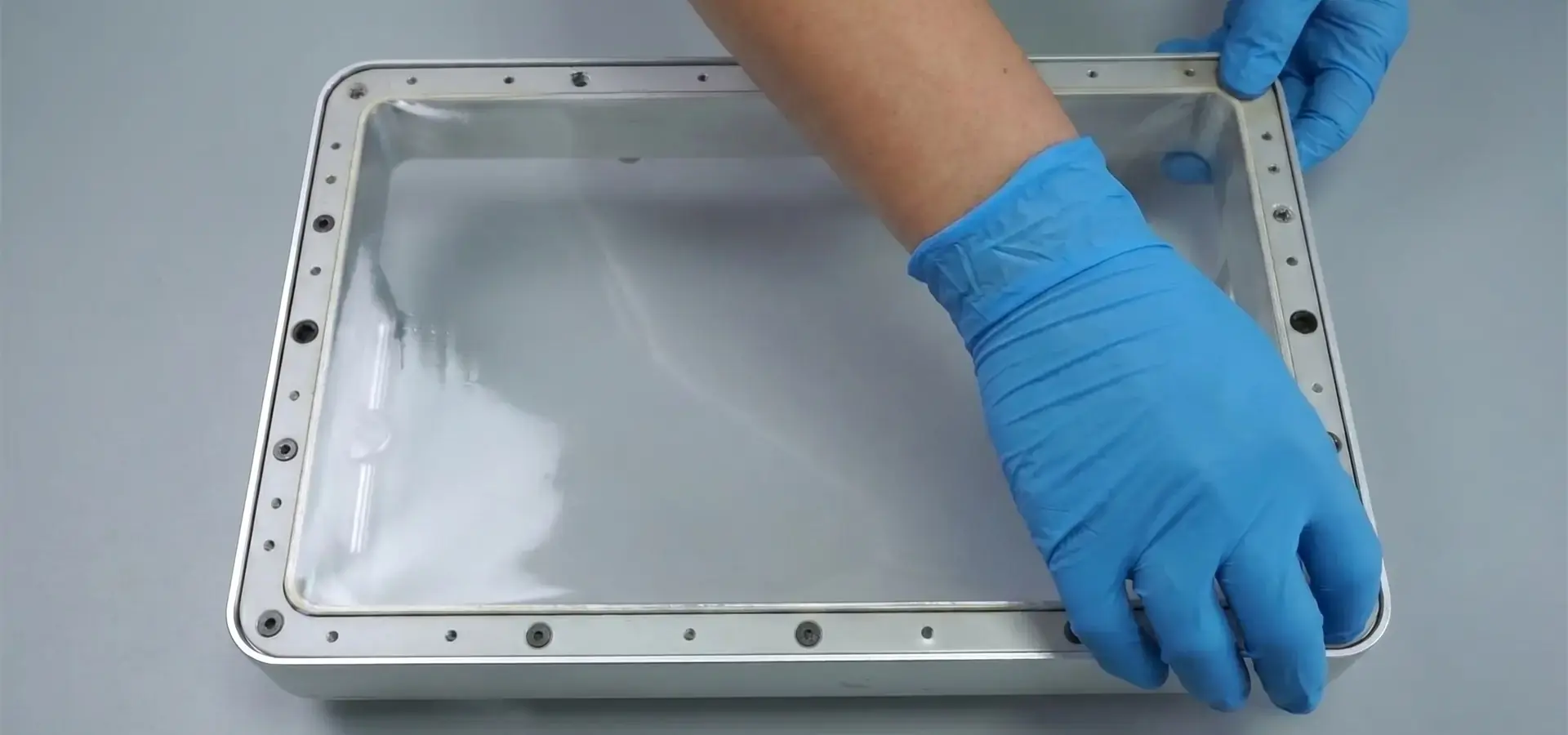
Maintaining the resin tank has a direct effect on how well prints come out. Over time, repeated contact and mechanical stress from the build platform separating cured layers from the film surface cause the FEP release film to gradually become cloudy, warped, or less tensioned. Under bright light, a visual review shows that the material is becoming less clear or deformed and needs to be replaced. Depending on the exposure settings and part geometry, most films can handle 20 to 50 print cycles. Aggressive settings shorten the films' lifespan. Replacing FEP before it fails completely stops disastrous failures where film breaks during printing, letting uncured resin leak into the printer's base and possibly damaging electronics.
Leveling the build platform makes sure that layers stick together evenly and that the dimensions are correct. To level something by hand, you remove the platform fixing screws, move it down until the move it down until the build platform is properly aligned against the leveling surface, and then tighten the screws to keep the level. Even though auto-leveling systems with sensors make this process easier, it's still a good idea to use paper leveling checks every so often to make sure that the gaps are always the same 0.1 mm.
Lubricating the Z-axis rod stops it from sticking and lowers the pressure on the stepper motor. Every 50 to 100 hours of printing, light machine oil should be put on the lead screws to keep the vertical movement smooth. Too much grease makes dust build up, so using a small amount of oil and then wiping off the extra levels reduces the risk of contamination.
Troubleshooting Common Technical Issues
Cleaning an LCD screen gets rid of the resin that builds up on the protected glass surface below the resin tank. Cured resin residue can be removed with isopropyl alcohol on a cotton cloth without damaging the screen. Light transmission consistency is kept up by regular cleaning. This stops underexposure in dirty areas, which shows up as print flaws.
Print binding problems are usually caused by an uneven base, not enough bottom-layer exposure time, or dirty FEP films that are dirty. Increasing the bottom layer's contact by 20–30% above standard settings makes the bonding stronger during the first few levels, which are very important. If parts keep coming off during the print process, sanding the build platform with 220-grit sandpaper makes tiny bumps that improve mechanical grip.
Layer moving or errors in measurements are often signs of mechanical parts that are loose. Positional drift can be stopped by checking the tightness of the belt, tightening the screws that secure the linear rails, and making sure that the connections on the stepper motor are correct. Software problems, like wrong exposure times, need test prints using calibration models that show under- or overexposure by distorting features in a way that can be measured.
Unfinished parts that are cloudy or delaminated are caused by not drying enough or getting too much moisture on them. Putting the post-cure times under UV light for an extra 10 to 20 minutes makes sure that all of the photopolymer chains are crosslinked, which increases the material's mechanical strength and chemical resistance. When you wash parts well in new isopropyl alcohol, you get rid of any uncured resin that might get in the way of proper sealing during the post-processing phase.
Keeping specific logs of resin batch numbers, exposure settings, and maintenance tasks makes it possible to find patterns when quality problems happen. This data-driven method speeds up the process of finding the root cause of a problem and keeps it from happening again after it has been fixed.
Procurement Considerations: Where and How to Buy Low-Cost SLA Printers?
When making strategic buying choices, it's important to weigh the capabilities of the equipment against its total cost of ownership. It's also important to build relationships with trusted low-cost SLA printer providers who can meet long-term operating needs.
Identifying Trustworthy Sources
Authorized dealers offer guarantees backed by the maker, certified training materials, and first-class technical support. These outlets make sure that the hardware and products are real, so gray-market sellers don't have to worry about the risks that come with selling fake parts. Regional distributors often have display centers where purchasing teams can see the tools for themselves and talk to application experts about how to make their work flow better.
Direct connections with manufacturers are good for businesses that need to deploy multiple units or make custom setups. Volume buying deals allow for tiered discounts, which usually save you 10-15% on orders of five or more units, with extra discounts for commitments of ten or more units. Manufacturers may offer longer guarantee terms, free training sessions, or combined consumable packages that lower the cost per print during the early stages of rollout.
Online markets make prices clear, but you need to be very careful about checking out the names of sellers. Fraud risks are lower on established platforms with buyer security policies, but users give up direct relationships with manufacturers that make it easier to get help in the future. When compared to new units, refurbished equipment from reliable resellers saves buyers 20–40% on costs, making it a good choice for people on a budget who don't mind cosmetic flaws or shorter guarantee coverage.
Understanding Total Cost of Ownership
The initial cost of buying tools is only one part of long-term costs. Based on average use, a low-cost SLA printer that costs $1,500 might need $200 to $400 a year in new FEP films, resin tanks, and LCD screens. Photopolymer resin prices range a lot, from $25 to $35 per liter for basic gray formulas to $80 to 120 per liter for specialized engineering grades. To figure out how much a part costs, you have to add up how much plastic is used, how much support material is wasted, how many consumables last, and how many hours of work are needed for post-processing.
Energy costs are still very low—even heavy users who run their printers for 8 to 12 hours a day spend less than $5 a month on power. However, proper ventilation and air filtration systems can increase the overall setup cost. Photopolymer resins give off volatile organic chemicals that need to be properly vented or filtered with activated carbon to keep the air safe in sealed areas. For desktop stereolithography, fume extraction units can be as cheap as $150 for passive carbon filters or as expensive as $800 or more for driven systems with HEPA pre-filtration.
There are more facility needs than just the printer size. Post-processing stations with ultrasonic cleaners, wash stations, and UV curing rooms take up extra space. Depending on the amount of work being done, you should spend between $500 and $1,500 for all of the finishing equipment. As supplies need to be replaced regularly, safety gear like nitrile gloves, protective glasses, and resin-resistant aprons adds another $100 to $200 to the ongoing costs.
Building Supplier Relationships
Long-term relationships with equipment providers have perks that go beyond just getting a good deal. Preferred customers are told about new products before they come out, get early access to firmware changes, and are invited to workshops where people in the same business share the best ways to make apps. Technical account managers who are assigned to high-value clients help optimize processes and solve complicated problems that are beyond the scope of standard support.
Service level agreements, or SLAs, help make promises official by putting them in writing. Premium SLAs promise four-hour reaction times for major hardware failures, shipping of new parts the next business day, and preventive maintenance visits by qualified techs every three months. These agreements are very helpful for businesses where production slowdown directly affects income or customer promises, even though they add 15 to 25 percent to the annual running costs.
When you buy things from other countries, you need to pay attention to import rules, customs fees, and voltage compatibility. Electrical standards range around the world, with 110V systems in North America and 220V power in Europe. This means that specifications must be checked before a purchase is made. It's harder to get warranty service across international lines because some makers want you to send the item back to the country where it was made for repairs, which can cause longer downtime and higher shipping costs. For small price increases, regional wholesalers who can provide local service can get rid of these problems.
Strategic Partnership Opportunities
Companies that want to find integrated solutions for materials and tools benefit from sellers with a wide range of products. Companies like Magforms, which have 22 patents and 30 filed trademarks, offer highly optimized resin-hardware pairs that get rid of the compatibility problems that come up when using third-party materials. Their own technologies make printing 30% or more faster by using optimized LCD exposure systems, advanced optical calibration, and intelligent exposure control algorithms that keep the accuracy at the micron level. Their combined approach to 3D printing is used by over 300 businesses in over dozens of countries. It is backed by extensive technical training programs and a fast global support infrastructure. When looking for long-term partnerships, procurement teams should give more weight to providers with proven technological roots and a strong presence in foreign markets.
Conclusion
Desktop stereolithography technology has grown up enough to be useful for workers who need high-resolution 3D printing but don't want to spend a lot of money on industrial equipment. A low-cost SLA printer can produce highly detailed parts with fine dimensional consistency, making it useful for practical prototyping, dental models, jewelry casting, and small-batch production in many fields. To choose the right tools, you need to carefully consider the build volume, the suitability of the materials, and the supplier's support infrastructure. Print quality and equipment life are both improved by following strict upkeep procedures, such as handling resin correctly, replacing consumables on time, and regularly calibrating the machine. Strategic relationships with well-known makers offer bundled hardware and material solutions, technical know-how, and quick customer service that raise operating efficiency and lower the total cost of ownership.
FAQ
Can budget stereolithography systems accept third-party resins?
Open-system printers that are made to work with a wide range of materials let users set the exposure settings for any 405nm photopolymer plastic. This greatly lowers the cost of the materials. Software limits or physical chip authentication are used by closed-system tools to make sure that proprietary resins are used. Third-party resins are cheaper, but users have to make sure that the print settings are correct using test grids, which could mean that they have to do dozens of prints to get the best results. Manufacturer-validated materials come with pre-set profiles that guarantee reliable output right away. This is helpful when production schedules don't allow for lengthy testing.
How does stereolithography precision compare to filament deposition?
The XY precision of SLA technology is 19–50 microns, while many desktop FDM systems typically operate with 100–300 micron layer heights and lower XY detail resolution than LCD resin printers. This means that fine surface shapes can be made that can't be made with filament extrusion. Resin printing generally reduces visible layer lines and can provide more consistent surface quality than filament-based printing. But photopolymer parts are more fragile and sensitive to UV light than industrial thermoplastics like ABS or polycarbonate, so it's important to choose the right material for the job.
Are budget units suitable for professional rapid prototyping?
Desktop stereolithography tools can successfully meet the needs of engineering testing and form-factor validation. Dental labs, jewelry casting shops, and product design firms all over the world count on low-cost SLA printers to keep their production lines running smoothly. When making a lot of things, there are limits. This is because industrial tools have bigger work areas and more advanced automatic material handling systems that make up for their 10–20 times higher capital costs by providing better throughput and the ability to run without being watched.
Partner with Magforms for Your Stereolithography Needs
Magforms is a trustworthy, low-cost SLA printer provider with years of experience in the field and a full technical support system that helps over 300 businesses around the world. Our method of integrating materials and equipment gets rid of compatibility issues by using highly optimized photopolymer formulations along with our own gear that allows for 30%+ faster print speeds and high dimensional consistency and fine-detail reproduction. Our engineering team creates custom solutions that fit your unique process needs, whether you're starting a dental lab, making more jewelry, or shortening the time it takes to develop a new product.
We have large foreign distribution networks in place in North America, Europe, and Asia. This lets us send consumables quickly and provide service support in the areas where they are needed. Our 22 patents and 30 filed trademarks show that we have consistently invested in research and development to improve desktop stereolithography while keeping prices low enough that small businesses and growing firms can afford them. Email info@magforms.com to talk about your application needs, get samples of materials, or set up a time to see how the equipment works. Our buying specialists do in-depth analyses of return on investment (ROI), help choose materials, and create implementation roadmaps that make sure technology is adopted smoothly. Find out how Magforms' track record of helping a wide range of businesses can speed up your growth cycles with reliable, low-cost SLA printer solutions.
References
1. Gibson, I., Rosen, D., & Stucker, B. (2021). Additive Manufacturing Technologies: 3D Printing, Rapid Prototyping, and Direct Digital Manufacturing (3rd ed.). Springer.
2. Jacobs, P. F. (2020). Stereolithography and Other RP&M Technologies: From Rapid Prototyping to Rapid Tooling. Society of Manufacturing Engineers.
3. Stansbury, J. W., & Idacavage, M. J. (2019). "3D Printing with Polymers: Challenges among Expanding Options and Opportunities." Dental Materials, 32(1), 54-64.
4.Melchels, F. P., Feijen, J., & Grijpma, D. W. (2020). "A Review on Stereolithography and Its Applications in Biomedical Engineering." Biomaterials, 31(24), 6121-6130.
5. Ligon, S. C., Liska, R., Stampfl, J., Gurr, M., & Mülhaupt, R. (2018). "Polymers for 3D Printing and Customized Additive Manufacturing." Chemical Reviews, 117(15), 10212-10290.
6. Quan, H., Zhang, T., Xu, H., Luo, S., Nie, J., & Zhu, X. (2020). "Photo-Curing 3D Printing Technique and Its Challenges." Bioactive Materials, 5(1), 110-115.


Magforms makes design and manufacture easier.
Popular Blogs
-
 Industry InsightsManufacturing Industry
FDM vs. SLA Printer: Which Technology Is Right for Your Project?
-
 Industry InsightsManufacturing Industry
Top 5 Applications of Industrial 3D Printers in Manufacturing Today
-
 Industry InsightsManufacturing Industry
Why Stereolithography 3D Printers Are Unmatched for Microfluidic Device Prototyping?
