Desktop SLA 3D Printer Setup: Easy or Complex?
Setting up a desktop SLA 3D printer might seem hard at first, but with newer tools, the process is getting easier and easier. Stereolithography technology needs precise measurements and careful handling of the resin. However, modern machines have user-friendly interfaces and guided routines that make the process much simpler. Setting up usually involves putting together the hardware, installing software, leveling the build base, and getting the resin ready. These are all jobs that people with basic technical skills can complete in a few hours. In business-to-business settings, where production accuracy is essential, knowing these setup details is what determines operating efficiency and return on investment. Setting up a desktop SLA 3D printer can be easy or a bit complicated, based on the quality of the equipment, how well the maker supports it, and how well the user prepares.
Understanding Desktop SLA 3D Printer Setup: Basics and Challenges
Setting up a desktop SLA 3D printer can be easy or a bit complicated, based on the quality of the equipment, how well the maker supports it, and how well the user prepares. Procurement experts and technical managers can set realistic goals when they understand these basic issues. While the setup process is time-consuming and needs careful attention to detail, it sets the standard for all the other production activities that follow.
How Stereolithography Technology Works in Desktop Systems
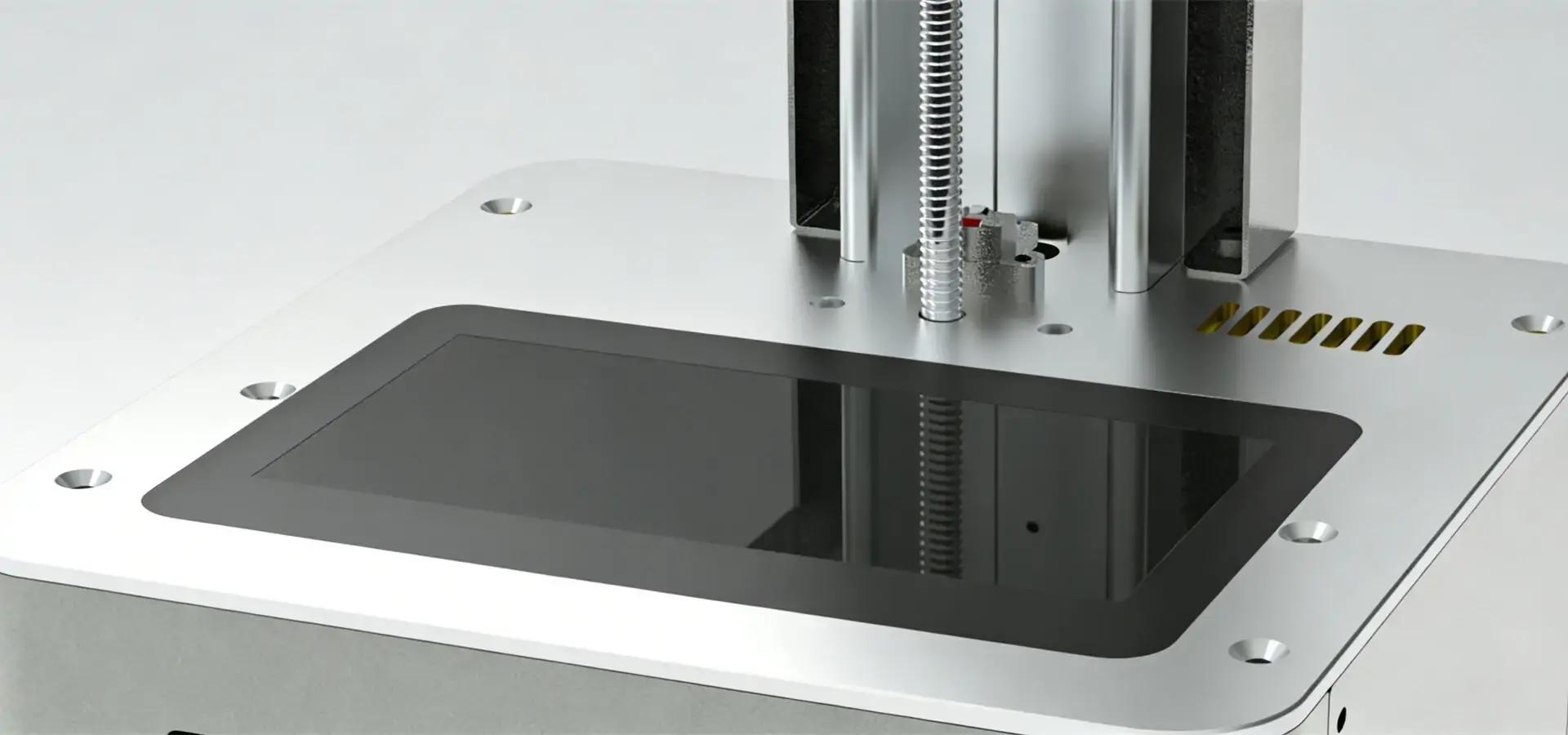
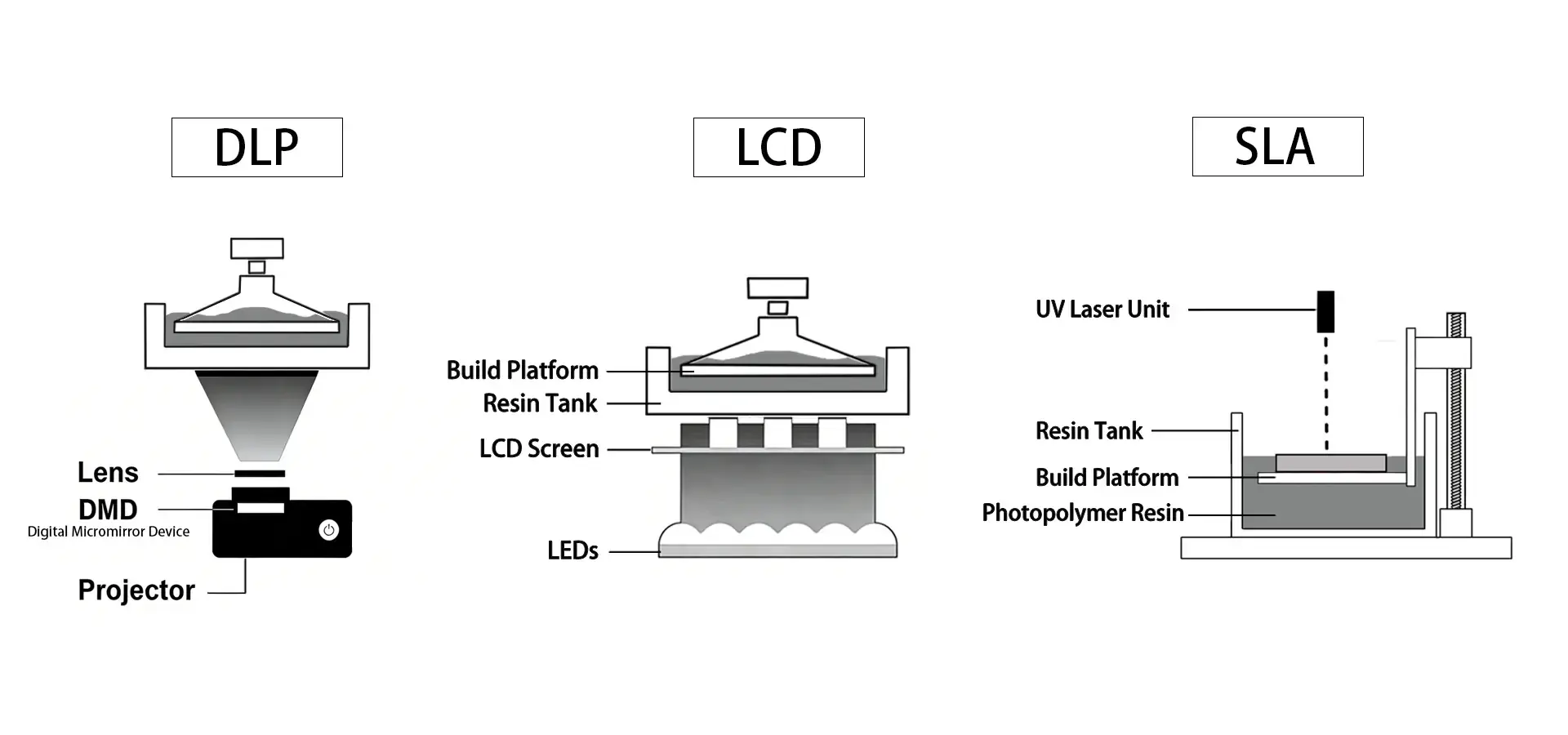
Stereolithography is one of the oldest and most accurate ways to make things by adding material to them. A desktop SLA 3D printer typically uses vat photopolymerization technology to cure liquid resin layer by layer. In many modern desktop systems, especially LCD-based mSLA printers, a UV LED light source shines through an LCD masking screen to cure entire layers simultaneously. Some higher-end SLA systems still rely on precision UV lasers guided by galvanometer mirrors, enabling horizontal resolutions typically ranging from 25 to 85 microns. This laser-based approach differs from DLP and LCD-based mSLA systems. DLP printers project images using a digital projector, while LCD systems use an LCD masking panel combined with a UV backlight to cure an entire layer at once.
Desktop versions of SLA technology offer industrial-level accuracy in small packages that are perfect for labs, design workshops, and small factories. The resin vat, build platform, optical engine, Z-axis motion system, and control electronics are the primary components of the machine. Properly calibrated desktop resin systems can achieve high dimensional accuracy suitable for dental, prototyping, and engineering applications. Because of the precision required in vat photopolymerization, setting up these systems generally requires more care than setting up entry-level FDM printers.
Typical Setup Workflow from Unboxing to First Print
The first step in setting up is carefully taking everything out of the box and checking it all over. Most desktop SLA 3D printer models come partially put together, so users need to connect the power and data cords, attach the build platform, and set up the resin vat. Depending on how the maker designed the part, the mechanical assembly step usually takes 20 to 40 minutes.
After installing the software, users download their own slicing programs that get 3D models ready to print. This program takes CAD files and turns them into step-by-step directions. It also makes support structures and figures out exposure times based on the properties of the resin. Modern systems can join via USB, Wi-Fi, or straight Ethernet, which makes it easy to add them to digital processes that are already in place. Configuration includes choosing the settings of the machine, changing the software if needed, and getting the computer and printer to talk to each other.
Leveling the build base is the most important part of the measuring process. The base has to be perfectly parallel to the bottom of the resin vat so that the layers stick together and form correctly. Manual leveling takes time and accuracy, while automatic leveling methods require less work from the user. Even small misalignments, measured in fractions of a millimeter, can cause print failures, waste resin, and reduce production efficiency.
Common Challenges Faced by B2B Users
Getting accurate measurements is still the biggest problem for companies that want to use stereolithography tools. Aligning the build base has an impact on each subsequent layer, making this initial step very important. During the initial setup, technical staff often spend a lot of time making sure that the Z-axis moves perpendicular to the vat surface. This keeps finished parts from becoming misshapen.
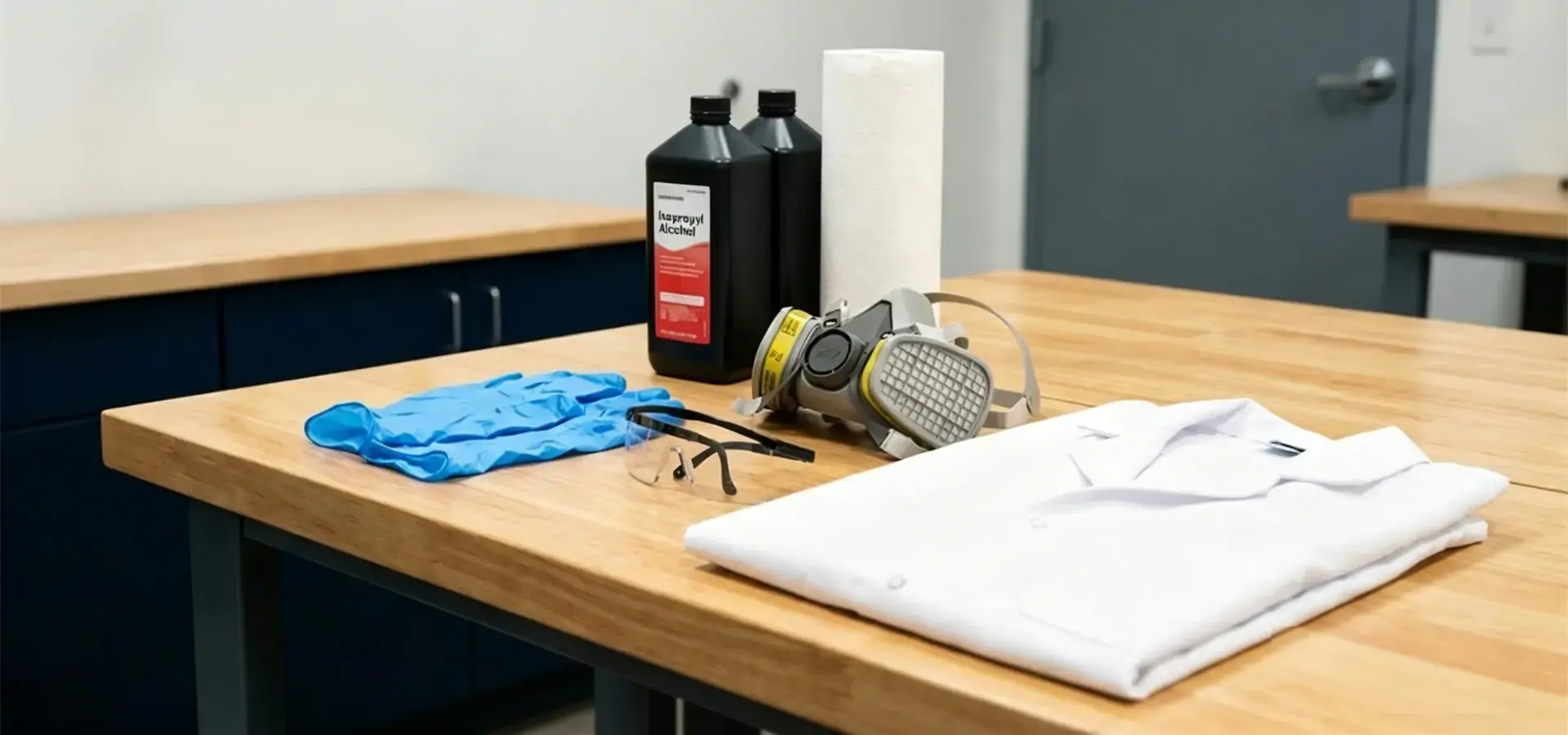
Photopolymer resins need to be stored carefully at controlled temperatures, kept away from UV light, and given enough air flow while they are being used. Material safety data sheets list the safety measures that need to be taken, such as wearing gloves and goggles, and making sure there is enough airflow in the work area. Companies need to set rules for spilling resin, cleaning vats, and getting rid of trash that follow environmental laws and produce as little waste as possible. Industrial users should also verify resin compliance requirements, biocompatibility certifications, and workplace safety regulations before deploying desktop resin printing systems in regulated industries such as medical or dental manufacturing.
When adding a desktop SLA 3D printer to a current CAD/CAM ecosystem, software compatibility problems can happen. Standard STL or OBJ files can be opened by most systems. However, custom slicing software might not work well with design programs used in the medical, aerospace, or automobile industries. By looking at software communities before buying it, you can avoid problems with processes after installation.
Factors Influencing Initial Setup Time
The complexity of the equipment directly affects the time it takes to set up. Beginner machines that need to be calibrated by hand may take three to five hours to fully set up, which includes test prints and setting optimization. This time can be cut down to less than two hours with professional systems that have touchscreen displays, automatic calibration, and full setup tools.
How well the setup works depends a lot on how knowledgeable the user is. Teams of engineers who know CAD tools, mechanical systems, and the features of materials can get through the setup steps faster than teams that are new to additive manufacturing. Spending money on training programs before the equipment arrives speeds up rollout and cuts down on the time needed to fix problems.
How quickly teams fix problems that come up out of the blue depends on the quality of the manufacturer's help. Companies that offer thorough instructions, video lessons, and quick technical support can help fix setup problems more quickly. When working with special apps or putting printers together in specific production settings, this support is very helpful.
Step-by-Step Breakdown of Desktop SLA 3D Printer Setup
These strategies turn setup processes that could be too much work into doable, organized routines. Structured methods help technical teams feel more confident and help businesses get more out of their equipment purchases more quickly.
SLA-Specific Setup Intricacies Compared to Other Technologies
Stereolithography is different from filament-based printing methods because it uses resin instead of filament. In FDM systems, users only need to add a spool. However, a desktop SLA 3D printer requires users to pour liquid photopolymer into the vat, monitor resin levels during prints, and organize the material between sessions. Resins have different viscosity levels, curing characteristics, and shelf lives that can affect how well they print. Some engineering-grade formulations require heated resin vats or controlled-temperature handling procedures, which makes them more complicated than thermoplastic strands.
Layer tuning in SLA systems needs more accuracy than in FDM systems. Each finished layer must separate from the clear bottom of the vat using a peel device that works within exact force limits. If there is too much pulling force, it can damage delicate parts or knock them off the build platform. If the peel force isn't strong enough, uncured resin can get into the optical window and mess up the print. To calibrate this balance, you need to know how machines work and how materials behave.
Print quality is directly affected by the cleanliness of the optical path. If there is dust, resin splatter, or fingerprints on mirrors, lenses, or vat windows, they can scatter or absorb laser energy, which can lead to uneven cure or measurements that aren't accurate. In order for extrusion-based technologies to work, they don't need to have upkeep steps for inspecting and cleaning optical parts as part of the setup process.
Root Causes of Complexity and Practical Streamlining Methods
Complexity often stems from attempting to achieve production-level results right away without regular testing, which can lead to a lot of complexity. Methodical methods that set a baseline level of performance before moving on to more difficult shapes or materials are good for organizations. Trial-and-error processes can be cut down by making a setup checklist that includes hardware assembly, software settings, initial calibration prints, and writing down the parameters that worked.
Checking for resin and software compatibility stops common problems before they happen. Before going into production, technical teams should make sure that the material works with their specific machine model, that the software profiles match the properties of the resin, and that the support generation methods give them accurate results for the shapes of their typical parts. Manufacturers like Magforms offer the best combinations of materials and tools, which get rid of any questions about compatibility and make setting up a lot easier.
Using tools from manufacturers helps speed up skills. Comprehensive training programs, whether they are in-person or online, teach people about the quirks of each machine, the best setting ranges, and how to fix problems. Companies that spend in thorough training reach full production capacity 40% faster than companies that only use written documentation.
Real-World Case Studies from Medical and OEM Manufacturing
A medium-sized dental lab used desktop SLA 3D printer technology to make orthodontic devices and surgery guide models. Their first setup took four days longer than planned because the team lacked experience with resin handling and calibration procedures. After teaming up with a manufacturer that offered dedicated training, setup time was cut down to less than six hours for future installations at other sites. The lab now has eight tools spread out over three sites. Each week, they make over 200 unique dental models that are always accurate in terms of size.
A supplier to a car OEM started using stereolithography to make quick prototypes of small mechanical systems and interior trim parts. At first, it was hard to get big, flat shapes to stick properly and to find the best support structures to cut down on post-processing time. The team cut the number of setup-related print failures from 18% to below 3% by using maintenance plans and setting up processes for rotating the resin. This change saved more than $12,000 a year on materials and sped up shipping times for prototype versions.
When setting up desktop SLA 3D printer systems, a company that makes housings for wearable electronics ran into problems with software interaction. The way they did CAD before used simulation tools that made files in non-standard forms. They worked with the printer maker's applications engineering team to make a custom export script that kept the design purpose while the files were being converted. The time it took to set up new projects was cut by 60%, which made it easier to make changes to designs during product development processes.
Actionable Best Practices for Optimized Setup
Setting up standard operating procedures from the start makes sure that all workers and production shifts follow the same rules. The documentation should include steps for starting up the machine, handling resin, regular upkeep tasks, and decision trees for fixing. When many people on a team follow the same steps, performance is more consistent, and differences in quality are less noticeable.
Keeping the area organized helps activities run smoothly. Having separate places to store resin with temperature tracking, following clean-room-style rules when working with optical parts, and organizing tools in a way that makes sense all cut down on the chance of contamination and make daily tasks easier. Investing in good lighting, checking tools with magnifying glasses, and organizing storage for consumables can pay off in a big way for the business.
Using gradual validation methods makes people more confident in how well a system works. Instead of making important parts right away, teams should print standard test shapes that show how accurate the calibration is, how precise the dimensions are, and how good the surface finish is. These confirmation prints set baselines for performance and make it easy to see when tuning needs to be done again.
By setting up feedback loops between operators, engineers, and management, problems that keep happening can be found before they affect output plans. For ongoing optimization to happen, teams need to meet regularly to talk about how to improve processes, how to make tools work better, and how materials behave. Long-term results are better for organizations that see setup as an ongoing process of improvement rather than a one-time event.
Comparative Analysis: Desktop SLA Setup vs Other 3D Printing Technologies
Applications demanding the highest precision—medical devices, aerospace components, and precision tooling—justify the additional setup rigor that desktop SLA 3D printer technology requires. Stereolithography generally delivers smoother surface finishes, finer feature resolution, and more consistent mechanical properties than many entry-level FDM systems. When micron-level accuracy in measurements decides whether a product can be made, setup complexity is possible.
Assembly Complexity and Calibration Precision Differences
Assembling an FDM printer usually doesn't need to be as precise. The print head is put in place, the filament filling system is set up, and the bed is leveled to within tenths of a millimeter. Even though they are important, these steps for tuning are easier to get right than with stereolithography systems. A desktop SLA 3D printer needs to be calibrated with accuracy measured in hundredths of millimeters. Even small errors can cause prints to fail or measurements to be off.
DLP systems use projected digital light to cure entire layers simultaneously. They have some of the same problems with handling resin as SLA systems, but their optical systems are usually easier to understand. DLP machines have fewer orientation options because they don't have moving laser parts or galvanometer mirrors. The difficulty of setup is somewhere between FDM and laser-based stereolithography. This makes it a good choice for companies that want to make things that are easy to use while still getting the benefits of resin's accuracy.
LCD-based mSLA printers are widely regarded as the most accessible form of vat photopolymerization technology for desktop users. The optical system typically combines a UV LED array with an LCD masking panel, reducing the amount of optical calibration required compared with laser-based SLA systems. The setup process is a lot like setting up a DLP system, but it costs less. Because the LCD masking panel is continuously exposed to UV energy during printing, it is considered a consumable component and may require periodic replacement depending on operating hours and light intensity.
Material Handling Workflows: Resin vs Filament
When you store filament, you need to keep the spools from absorbing water. This is easy to do with sealed cases and desiccant packs. It only takes seconds to load filament into an FDM printer, and changes in material don't need any special safety gear.
Structured rules are needed for managing resin. Changes in temperature, exposure to light, and contamination can still affect photopolymers. When setting up, the plastic needs to be heated to the right temperature for printing, it needs to be mixed well to get rid of any settled parts, and it needs to be carefully poured so that air bubbles don't get trapped. Teams have to decide whether to leave resin in the pot or put it back in bottles between print sessions. Each option has its own benefits when it comes to ease and material preservation.
After hundreds of printing hours, the vat itself breaks down, and the clear film or PDMS layer starts to break down. Unexpected downtime can be avoided by knowing when to repair things and keeping extra parts on hand. As part of their business planning, companies that use stereolithography need to set aside money for these supplies.
Impact of Speed and Quality Requirements on Setup
FDM or DLP technologies may work better in production settings that value speed over absolute accuracy. Setting up these systems is faster, managing materials is easier, and the quality is good enough for many technical uses. The choice depends on what performance traits make a project successful.
Differences between desktop and factory SLAs affect setting issues. Industrial systems have warm rooms, automatic systems for handling resin, controls for an inert atmosphere, and complex tracking systems that require less work from the user. These features make the tools much more expensive, but they make setting up easier and make it easier to do again. With desktop resin printers, users typically assume more responsibility for calibration, resin management, and routine maintenance during setup and operation.
Procurement Guidance Based on Technical Requirements
For companies with experienced engineering teams that are used to working with precise tools, setting up a desktop SLA 3D printer is straightforward and worth it because it improves speed. Even though it's harder to learn than filament printing, it can be done with the right help from the maker and training.
If a company is new to additive manufacturing, it might want to start with FDM or LCD technologies to learn the basics before moving on to laser-based stereolithography. This step-by-step method improves operator skills and planning methods without giving teams too many new problems to deal with at once.
Stereolithography's setup cost is justified by project portfolios that focus on practical prototypes with tight tolerances, smooth surfaces, or complicated shapes. The technology works great for things like optical housings, snap-fit systems, and fluid flow components where the finish directly affects how they work. This makes the setup work worth it to get to these features.
The budget includes more than just the cost of buying the tools. It also includes the cost of teaching time, materials, and setting up the facility. A comprehensive total cost of ownership analysis reveals whether a desktop SLA 3D printer's capabilities align with organizational needs and resources. The best results come from making purchasing choices that balance initial investment with long-term output needs.
Conclusion
There is no simple answer to the question of whether setting up a desktop SLA 3D printer is easy or difficult because experiences vary depending on the quality of the tools, the needs of the application, and the readiness of the organization. Modern systems have automatic testing, easy-to-use interfaces, and lots of documents that have made many old problems easier to deal with. The process is still harder than filament printing, but the benefits in accuracy and surface quality make up for the extra care that is needed. A lot of what determines success is picking tools that fit your technical skills, investing in proper operator training and following regular maintenance schedules. Organizations that use stereolithography with realistic goals, the right amount of planning, and a dedication to improving operator skills always get great results, turning the initial setup challenges into regular steps that make it possible to make amazing things.
FAQ
What makes a desktop SLA 3D printer setup different from FDM printers?
Stereolithography systems require liquid resin handling rather than solid filament loading, demanding greater attention to material safety, storage, and preparation. Calibration tolerances prove tighter, with build platform leveling requiring precision measured in hundredths of millimeters versus tenths for FDM systems. Optical components need regular cleaning and inspection to maintain performance. The vat itself becomes a consumable requiring periodic replacement. While these differences increase complexity, they enable the superior surface finish, dimensional accuracy, and more uniform surface quality and fine feature accuracy that distinguish SLA parts from many FDM-produced components.
How long does the initial desktop SLA 3D printer setup typically take?
Complete initialization, including unboxing, assembly, software installation, calibration, and successful test prints, generally requires three to six hours for first-time users. Experienced operators familiar with stereolithography principles can complete the setup in under two hours. Automated calibration features and comprehensive manufacturer support significantly reduce this timeline. Organizations should allocate additional time for material testing and parameter optimization when working with specialty resins or producing parts with demanding specifications. Subsequent setups proceed faster as teams develop proficiency.
Can small businesses without engineering staff successfully operate these systems?
Yes, particularly when selecting equipment designed for accessibility and partnering with manufacturers offering comprehensive training and responsive support. Modern Desktop SLA 3D printer models feature guided setup procedures, touchscreen interfaces, and automated maintenance reminders that reduce technical barriers. Investing in thorough initial training, maintaining detailed operating procedures, and establishing relationships with manufacturer support teams enables small organizations to achieve excellent results. Choosing integrated equipment-material solutions eliminates parameter development challenges that require specialized expertise.
Ready to Simplify Your Desktop SLA 3D Printer Setup Experience?
Magforms specializes in delivering integrated stereolithography solutions that dramatically reduce setup complexity while maximizing production reliability. As a trusted desktop SLA 3D printer supplier with 22 patents and a proven global presence across 300+ enterprises, we understand the challenges technical teams face during implementation. Our systems combine proprietary resins perfectly matched to our equipment, eliminating compatibility uncertainties that plague users of third-party materials. Advanced LCD exposure systems, optimized UV light distribution, and AI-assisted exposure strategies improve printing efficiency while maintaining high dimensional accuracy. Our experienced technical support team provides comprehensive training programs, detailed documentation, and responsive assistance throughout your ownership experience. Whether you're establishing your first stereolithography capability or scaling production across multiple facilities, Magforms offers the expertise and equipment quality that transform potential setup challenges into straightforward procedures. Contact our team at info@magforms.com to discuss your specific application requirements and discover how our proven desktop SLA 3D printer for sale can accelerate your production capabilities with confidence from day one.
References
1. Gibson, I., Rosen, D., Stucker, B., & Khorasani, M. (2021). Additive Manufacturing Technologies: 3D Printing, Rapid Prototyping, and Direct Digital Manufacturing (3rd ed.). Springer International Publishing.
2. Jacobs, P. F. (1992). Rapid Prototyping and Manufacturing: Fundamentals of Stereolithography. Society of Manufacturing Engineers.
3. Huang, J., Chen, Q., Jiang, H., Zou, B., Li, L., Liu, J., & Yu, H. (2020). A survey of design methods for material extrusion polymer 3D printing. Virtual and Physical Prototyping, 15(2), 148-162.
4. Stansbury, J. W., & Idacavage, M. J. (2016). 3D printing with polymers: Challenges among expanding options and opportunities. Dental Materials, 32(1), 54-64.
5. Quan, H., Zhang, T., Xu, H., Luo, S., Nie, J., & Zhu, X. (2020). Photo-curing 3D printing techniques and their challenges. Bioactive Materials, 5(1), 110-115.
6. Ligon, S. C., Liska, R., Stampfl, J., Gurr, M., & Mülhaupt, R. (2017). Polymers for 3D printing and customized additive manufacturing. Chemical Reviews, 117(15), 10212-10290.


Magforms makes design and manufacture easier.
Popular Blogs
-
 Industry InsightsManufacturing Industry
FDM vs. SLA Printer: Which Technology Is Right for Your Project?
-
 Industry InsightsManufacturing Industry
Top 5 Applications of Industrial 3D Printers in Manufacturing Today
-
 Industry InsightsManufacturing Industry
Why Stereolithography 3D Printers Are Unmatched for Microfluidic Device Prototyping?
