Entry-Level vs Professional Desktop SLA 3D Printers Compared
If you're looking into stereolithography for manufacturing or development, it's important to know the difference between entry-level and professional Desktop SLA 3D printer models. A Desktop SLA 3D printer works by curing layers of liquid photopolymer resin using controlled UV light sources. In modern desktop systems, this is most commonly achieved through LCD masking or DLP projection, while traditional laser-based SLA uses galvanometer-controlled UV lasers. This makes parts with the surface quality of an injection-molded part. Entry-level systems are usually used by small design companies, schools, and businesses that need cheap ways to do prototyping tasks every once in a while. Professional models, on the other hand, have the dependability, throughput, and material freedom that R&D departments in the auto industry, dental labs, aircraft component makers, and high-volume service offices need. Picking the right method has a direct effect on how quickly and accurately things are made, how much they cost in the long run, and a wide range of businesses, from making medical devices to developing consumer electronics.
Understanding Desktop SLA 3D Printers: Entry-Level vs Professional
Photosensitive resins can be solidified very precisely with desktop stereolithography systems that use computer-controlled UV light sources. This basic idea works the same way for both entry-level and professional levels, but how it is put into practice makes a big difference in how well it works in the real world.
Core Technology and Operating Principles
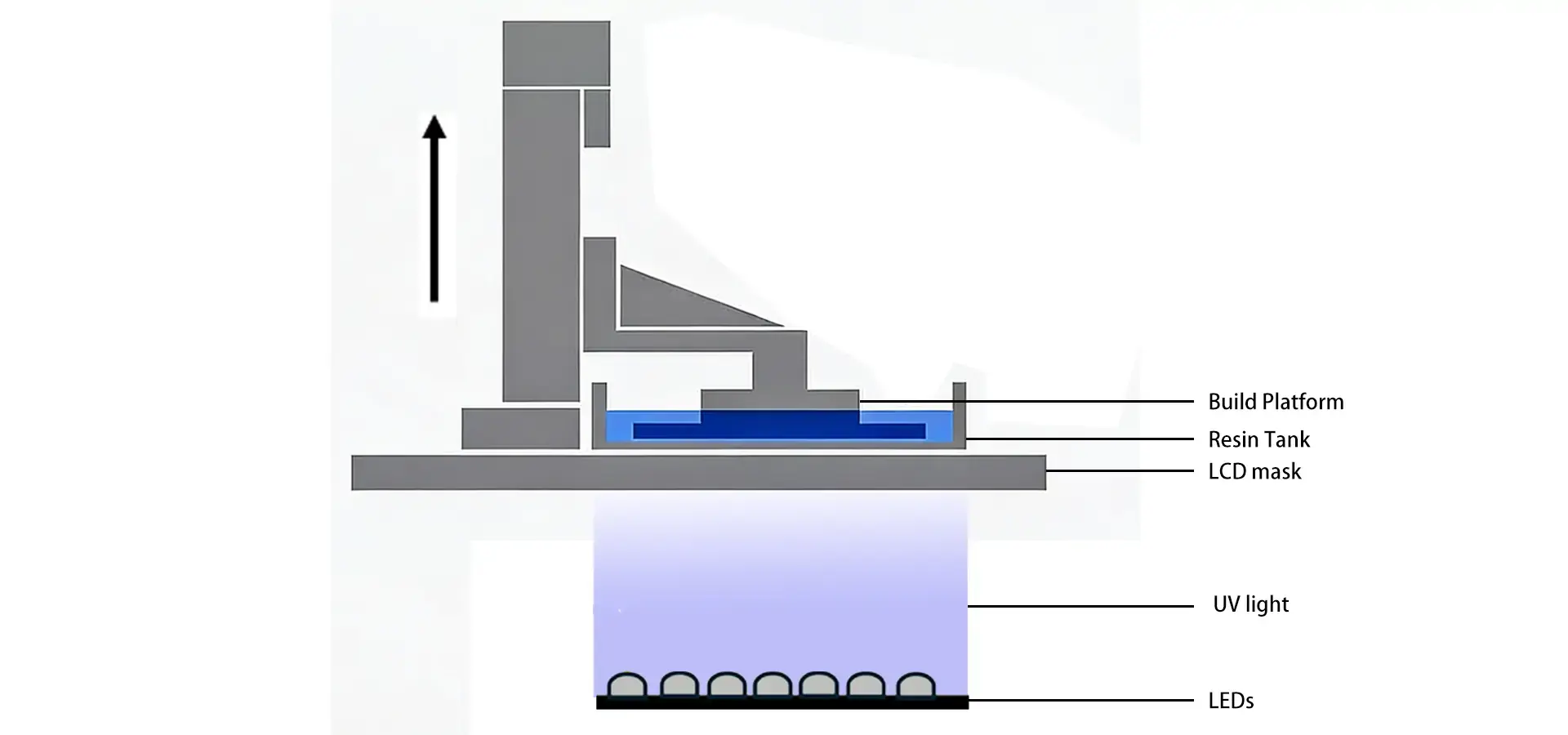
It is used by both cheap and expensive Desktop SLA 3D printer systems to cross-link liquid photopolymer resin using 405 nm UV light. The build platform moves in small steps, usually 25 to 100 microns per layer, which allows fresh resin to flow over previously cured layers. Entry-level desktop systems typically use LCD-based masked stereolithography or DLP projection, while higher-end laser-based SLA systems may use galvanometer scanning with variable spot control. Professional systems achieve high precision either through advanced laser scanning strategies or high-resolution LCD panels with optimized light uniformity and exposure control. LCD (mSLA) systems, in particular, enable simultaneous layer-wide curing, which significantly improves speed and consistency compared to point-scanning laser systems compared to point-scanning laser systems, significantly improving printing efficiency. This improvement in technology is very important when dental labs need Class IIa biocompatible surgical guides with tolerances of less than 100 microns or when car engineers are prototyping snap-fit parts that need to be waterproof.
Key Differences Between Entry-Level and Professional Systems
There is a bigger difference between these two groups than just price. Entry-level Desktop SLA 3D printer models usually have smaller build sizes (often only 120 x 68 x 150 mm), simple touchscreen controls, and can only use certain proprietary or third-party resins. These tools are used by product design teams that want to test ideas or make a small amount of custom jewelry. Professional systems have bigger build envelopes that can fit bigger dental arches or auto interior parts. They also have heated resin tanks that can handle high-temperature engineering materials (with heat deflection temperatures typically ranging from 80°C to over 200°C depending on the material) and offer open material platforms that lower the cost of consumables while increasing the number of uses. Aerospace companies that make complicated joints with internal channels can use professional-grade systems that give them accurate measurements that meet ISO 2768-m standards (usually ±0.2%). This makes sure that their work is compatible with CNC machining or metal casting processes that come after.
Typical Use Cases Across Industries
Entry-level systems are used by schools to teach the basics of additive manufacturing, by small art studios to make limited-edition works of art, and by new electronics companies to make prototypes of the housings for wearable devices. Accessibility and modest accuracy are more important than output throughput in these settings. Professional Desktop SLA 3D printer systems are used in settings where accuracy is directly linked to business results, such as orthodontic clinics that need to print clear aligner models that fit each patient perfectly, Tier 1 automotive suppliers that need to make prototypes for injection-molded interior trim, and university research labs that are making microfluidic devices with channel dimensions below 200 microns. Medical device makers like that professional systems can work with ceramic-filled biocompatible resins, which lets them print surgery tools that can be sterilized over and over again with steam. Professional-grade LCD and SLA systems are widely used in the footwear industry to make shoe models with intricate undercuts and surface textures that can't be achieved with regular subtractive methods.
Critical Comparison of Features and Performance
Decisions about what to buy are based on Desktop SLA 3D printer objective performance metrics that directly affect how much can be produced and how efficiently the business runs. Technical leaders and buying managers can make sure that equipment purchases are in line with long-term business goals by understanding how entry-level and professional systems differ in key ways.
Print Quality and Resolution Analysis
When it comes to surface finish quality, professional Desktop SLA 3D printer models always do better than entry-level models, getting Ra surface roughness values typically in the range of 1–3 micrometers depending on resin and settings right off the build platform. This feature gets rid of the need for post-processing sanding on cosmetic samples and oral appliances that need to be comfortable for the patient. Controlling the layer thickness is another important difference. Entry-level machines usually have set layer heights of 50 or 100 microns, but professional units can change the layer height dynamically from 25 to 150 microns, which lets them find the best balance between speed and detail based on the shape of the part. XY accuracy specs show big differences: entry-level systems usually have a positional range of ±150 microns, which is fine for conceptual models, but professional machines need to be accurate to ±50 microns for engineering parts that need precise hole-to-hole spacing. Professional-level dimensional accuracy is used by aerospace providers that make connector housings with tight mechanical connections to make sure that parts fit properly with aluminum extrusions during assembly validation.
Speed, Efficiency, and Throughput Considerations
Professional Desktop SLA 3D printer models have automatic systems for handling resin, environmental controls monitored by sensors, and the ability to run continuously, which isn't available on entry-level models. A normal entry-level system needs resin bottles to be changed by hand and prints to be supervised often, so it can't be left to run overnight without being watched. Professional versions come with bulk resin cartridge systems (often 5 liters or bigger), automated platform cleaning routines, and remote tracking through a network connection. This lets service companies work on multiple client projects without having to turn on the lights. There is a big difference in print speeds. Professional systems, especially high-resolution LCD-based platforms, can finish dental model batches 35 to 50 percent faster than entry-level systems that use the same STL files. For companies that make a lot of parts, this higher output directly means lower costs per part. Professional systems can handle eight to twelve builds per day, while entry-level systems can only handle four to six builds per day. This is helpful for automotive prototype shops that print iterative designs for panel components.

User Experience and Maintenance Requirements
Entry-level Desktop SLA 3D printer models focus on plug-and-play operation with easy-to-use touchscreens, setup tools, and basic calibration steps that users with little technical knowledge can handle. For maintenance, the plastic tank needs to be replaced every 50 to 100 prints, and the optical window needs to be cleaned with the alcohol wipes that come with the printer. Professional systems need more advanced skills from the user, but they make up for it with strong construction made for long-term use in factories. This difference can be seen in the longevity of the peel mechanism: entry-level machines use flexible FEP film that needs to be replaced every 30 to 50 prints, while professional units use long-lasting PDMS-coated or similar advanced release layers that are designed for extended durability, with lifespan depending on usage conditions and materials. Service companies using professional tools benefit from maintenance schedules that are predictable and easy to plan around, so that there is less unexpected downtime. Professional makers usually offer full support packages that include on-site installation, preventative maintenance visits every three months, and dedicated technical hotlines handled by application experts who know how to deal with problems that are unique to the industry.
Key Considerations for Procurement Decision-Making
When buying strategic tools, you have to weigh your short-term budget limits against your long-term running costs and output capabilities. When technical leaders look at desktop stereolithography systems, they shouldn't just look at the purchase price; they should also look at the total cost of ownership.
Upfront Investment and Long-Term Cost Analysis
Desktop SLA 3D printer models for beginners usually Desktop SLA 3D printer cost between $2,500 and $8,000. This makes them a good choice for companies and schools that don't have a lot of money to spend on new equipment. Even though the initial costs are cheaper, the costs of consumables are usually higher. For example, proprietary resin cartridges cost $150 to $300 per liter, while open-platform expert systems that accept third-party materials cost $75 to $150 per liter. Prices for professional gear range from $15,000 to $45,000, which is due to the fact that it has improved optics, strong mechanical systems, and full software environments. By figuring out cost-per-part metrics, we can see that skilled systems usually reach economic balance within 18 to 24 months when they make more than 500 parts per month. Automotive R&D labs that print 80 sample dashboards every month benefit from professional systems' lower consumable costs and faster processing, which helps them get their money back by reducing the time it takes to finish a job. Small jewelry companies that make 30 castable patterns a month might find that entry-level systems are enough for their present needs while still leaving them with money to grow their business.
Production Volume and ROI Considerations
When production needs more than 20 to 30 hours of print time per week, professional Desktop SLA 3D printer setups offer a strong return on investment. To keep wait times reasonable, service bureaus that handle many accounts for clients in the medical, dental, and industrial fields need professional equipment that is reliable and can be automated. The costs of unplanned downtime rise quickly. For example, the operational efficiency of a professional system that fails once every 2,000 print hours versus an entry-level unit that fails every 400 hours is very different. Dental labs that print surgery guides and orthodontic models, like how regular the output from professional systems is, which lets them keep their delivery promises to customers. Product design companies that only make show models sometimes may find it hard to justify the cost of professional tools when entry-level systems can do the job for occasional prototyping needs.
Supplier Reputation and After-Sales Support
Achieving success in procurement goes beyond just specifying the tools. It also includes making sure that the seller is stable and provides good service. Professional makers with a global footprint, like well-known names in the medical and aerospace industries, usually keep regional service centers staffed with qualified techs and full of spare parts. When production dates are coming up and equipment breaks down, this infrastructure comes in very handy. When it comes to entry-level providers, support systems are often smaller, which can make repair times longer, from days to weeks. Medical device companies that have to go through regulatory audits prefer sellers that offer validated process documents, material certification packages, and traceability methods. Entry-level providers that focus on consumers often don't have these features. It is important to carefully read the warranty terms. For example, entry-level systems usually come with basic coverage for one year, while expert agreements last for three years and cover the replacement of all parts. When you buy in bulk, you can arrange service level agreements, longer warranty terms, and lower prices on consumables. These benefits are mostly available from professional providers that have been around for a while and have established distribution networks.
Troubleshooting, Safety, and Best Practices
To get the most out of stereolithography tools, you need to follow preventative maintenance plans, follow safety rules, and use organized ways to fix problems. These methods make tools last longer and keep the quality of parts the same across production runs.

Common Issues and Preventive Maintenance
Regular servicing is a key component of Desktop SLA 3D printer dependability. The most common cause of failure is contamination of the resin tank. Particles that are only partly hardened build up in the vats and cause print adhesion problems and surface flaws. Before every build, professional operations use 190-micron mesh screens to clean the tanks and get rid of waste. Optical window clarity directly impacts laser power delivery; built-up resin films lower exposure intensity, leading to layers that aren't fully sealed and errors in measurements. Setting up a weekly routine to clean windows with isopropyl alcohol and microfiber cloths keeps the light penetration above 95%. Professional systems have built-in compensation methods, while entry-level units need to be recalibrated by hand using printed test patterns. The success of the first layer of adhesion depends on how accurately the build platform is leveled. As part of professional maintenance routines, tramming is checked every month using digital markers that can read to the 10 micron level.
Safety Protocols and Environmental Compliance
When working with photopolymer resin, strict safety rules are needed to protect the health of the workers and the stability of the surroundings. Photoinitiators and methacrylate monomers found in uncured liquid resins are known to be skin sensitizers and environmental dangers. For professional setups, you need fume extraction systems that keep negative pressure ventilation with adequate air exchange rates in accordance with local safety regulations, nitrile gloves to protect your skin, and safety glasses that block UV rays while you remove parts. Getting rid of spent resin is regulated like getting rid of hazardous garbage. Professional makers offer approved waste disposal partnerships that make sure EPA rules are followed. New workers often don't think about how important safety is, which can lead to workplace dermatitis and breaking the law. Using stepwise isopropyl alcohol baths in the right way (at least a two-step process) to wash parts properly gets rid of any uncured surface resin before UV post-curing. Professional dentistry labs follow written standard operating procedures for working with plastic, which meet FDA 21 CFR Part 820 quality system requirements for making medical devices.
Best Practices for Optimal Performance
Controlling the surroundings and regularly calibrating the Desktop SLA 3D printer is needed to get consistent measurement accuracy across production runs. Professional Desktop SLA 3D printer systems need to be kept at temperatures between 20°C and 25°C. If the resin viscosity changes outside of this range, it affects curing depth and how well the layers stick together. The way resin is stored affects how long it lasts and how well it prints. Professional businesses use first-in, first-out methods to change their stock and keep bottles out of direct sunlight and in temperature-controlled areas. Controlled surface roughening with light surface preparation when recommended by the manufacturer is used to prepare the build platform. This creates mechanical bonding points that keep the print from coming off during strong peel forces. Part orientation optimization cuts down on the need for support structures and reduces the number of obvious contact marks. Professional service companies use automatic nesting software to figure out the best build plans that make the most of the platform while reducing print time. Post-processing standardization makes sure that the same results are obtained every time: set wash times (usually 10 minutes in fresh alcohol), controlled curing exposure (specific joule amounts per resin formulation), and documented support removal methods keep parts from getting damaged or distorting in size.
Leading Desktop SLA 3D Printer Solutions and Technology Providers
On the market for stereolithography tools, there are well-known brands that make systems that are suitable for a range of business sizes and uses. Understanding how the competitive market changes helps buying teams find solutions that fit with the goals of the business.
Market Overview and Brand Positioning
There are a few well-known names that control the expert and entry-level Desktop SLA 3D printer markets. Formlabs has a strong foothold in the dental and medical fields thanks to its large libraries of biocompatible materials and regulatory paperwork that backs up FDA applications. Anycubic and Elegoo are both companies that make tools for beginners that are easy to use and don't cost a lot of money. Prusa has recently started to work with the stereolithography industry by using the open-source development community. These well-known sellers have a track record of dependability, and user groups share information on how to fix problems and make applications work better. Professional buying teams look for sources that have been around for a long time and are financially stable. This means that extra parts will always be available and software development will always be supported.
Material Compatibility and Ecosystem Integration
Professional LCD-based and SLA Desktop 3D printer platforms stand out because they support a wide range of materials. Open-system designs let third-party resin formulations work, so procurement teams can get engineering materials from a number of sellers at prices that are competitive. These materials can be high-temperature, flexible, or castable. This adaptability is very important when engineers working on cars need materials with mechanical qualities similar to ABS or when medical makers need biocompatible formulas that meet ISO 10993 cytotoxicity standards. Entry-level systems often use private resin cartridges with authentication bits that limit the types of materials that can be used. This makes the long-term costs of running the system higher. Professional platforms usually support offline slicing processes that use standard software, which makes it easier to connect to current CAD/CAM pipelines. Manufacturers of medical devices like systems that are compatible with verified software toolchains that help meet the design control standards of quality management systems.
Magforms' Integrated Solutions for Industrial Applications
Magforms has created complete Desktop SLA 3D printer solutions that solve important problems that makers and service providers in many industries are having. Our method combines special photopolymer materials with gear that works perfectly with each other. This gets rid of compatibility problems that lead to measurement errors and failed prints. Our systems achieve industry-leading speed through full-layer LCD exposure, significantly reducing print time compared to point-scanning laser technologies. They can still keep the micron-level accuracy needed for aerospace, medical, and precision electronics applications. With 22 patents and 30 filed trademarks to back it up, our technology base allows us to keep coming up with new products and services to meet new customer needs. Our global reach includes dozens of countries where we serve more than 300 businesses. We offer full technical help through regional service centers filled by application engineers who know how to solve problems that are unique to each industry. Our combined material-equipment environment helps procurement teams by making troubleshooting easier and making sure that output results are always the same. Real-world deployments in dental labs, auto prototype shops, and aerospace component manufacturers show that our systems are reliable even under tight production schedules. Failure rates that are much lower than industry standards have been proven through thousands of hours of continuous operation testing.

Conclusion
Before you choose between entry-level and professional Desktop SLA 3D printer models, you should carefully consider your production rate, accuracy needs, material freedom needs, and the total cost of ownership. Entry-level models are good for companies that want easy access and moderate accuracy for occasional prototyping tasks. Professional LCD and SLA systems, on the other hand, offer the reliability, throughput, and material versatility that industrial manufacturers, medical device makers, and high-volume service bureaus need. Strategic buying weighs the initial investment against the long-term running costs, the name of the provider, the level of after-sales support provided, and the ability of the equipment to be expanded as the business grows. Professional-grade systems with proven dependability, large material libraries, and integration tools that support current production processes are helpful for companies in the automobile, aerospace, medical, and consumer electronics industries.
FAQ
1. How do I determine which desktop SLA 3D printer category suits my business needs?
Check the monthly output rate, the accuracy of the measurements needed, and the performance requirements for the material. Entry-level systems may be enough for businesses that make fewer than 100 parts a month and don't need extreme accuracy. Companies that make more than 500 parts a month, need biocompatible or engineering-grade materials, or have to follow rules set by the government, should look at professional systems offering validated processes and comprehensive documentation.
2. What accuracy standards should I expect from professional stereolithography equipment?
As per ISO 2768-m guidelines, professional Desktop SLA 3D printer systems can usually get dimensions within ±0.2% and have an XY precision of 25 to 85 microns and a surface roughness value below 1 micrometer. These specs help with the prototyping of aircraft parts, the making of dental appliances, and the development of precise electronics housings that need an injection-molded surface.
3. How does stereolithography compare with FDM or DLP printing technologies?
When compared to FDM extrusion methods, stereolithography produces a better surface finish and more uniform mechanical features. It also gets rid of obvious layer lines and Z-axis weakness. When comparing LCD/DLP-based systems to laser-based SLA, laser systems offer continuous scanning accuracy over large areas, while LCD and DLP systems achieve XY resolution based on pixel size, often delivering highly consistent and repeatable detail for small to medium-sized parts.
Partner with Magforms for Advanced Stereolithography Solutions
Magforms offers complete Desktop SLA 3D printer options designed to meet the strict needs of industries like aircraft, medicine, automotive, and precise manufacturing. Our integrated method combines our own photopolymer materials with cutting-edge gear that uses high-resolution LCD exposure systems combined with optimized light engines and advanced slicing algorithms to print at the fastest speeds in the industry without sacrificing accuracy at the micron level. We offer reliable production capacity for both fast development and small-batch manufacturing. Our dependability has been proven by over 300 global business customers and thorough continuous operation testing. Our technical support team has years of experience in the field and can help with specific applications, full training programs, and quick service to keep production running as smoothly as possible. If you're a Desktop SLA 3D printer provider looking for reliable OEM partnerships or a manufacturer needing high-precision systems, we ask you to look into how our solutions can improve the way you make things. Contact our team at info@magforms.com right away to talk about your specific application needs, get sample parts that show what we can do, or set up on-site equipment demos that are tailored to your work setting.
References
1. Gibson, I., Rosen, D., & Stucker, B. (2021). Additive Manufacturing Technologies: 3D Printing, Rapid Prototyping, and Direct Digital Manufacturing (3rd ed.). Springer.
2. Jacobs, P. F. (2020). Stereolithography and Other RP&M Technologies: From Rapid Prototyping to Rapid Tooling. Society of Manufacturing Engineers.
3. Quan, H., Zhang, T., Xu, H., Luo, S., Nie, J., & Zhu, X. (2020). Photo-curing 3D printing technique and its challenges. Bioactive Materials, 5(1), 110-115.
4. Stansbury, J. W., & Idacavage, M. J. (2016). 3D printing with polymers: Challenges among expanding options and opportunities. Dental Materials, 32(1), 54-64.
5. Bagheri, A., & Jin, J. (2019). Photopolymerization in 3D printing. ACS Applied Polymer Materials, 1(4), 593-611.
6. Ligon, S. C., Liska, R., Stampfl, J., Gurr, M., & Mülhaupt, R. (2017). Polymers for 3D printing and customized additive manufacturing. Chemical Reviews, 117(15), 10212-10290.


Magforms makes design and manufacture easier.
Popular Blogs
-
 Industry InsightsManufacturing Industry
FDM vs. SLA Printer: Which Technology Is Right for Your Project?
-
 Industry InsightsManufacturing Industry
Top 5 Applications of Industrial 3D Printers in Manufacturing Today
-
 Industry InsightsManufacturing Industry
Why Stereolithography 3D Printers Are Unmatched for Microfluidic Device Prototyping?
