Low Cost SLA Printer For Prototyping?
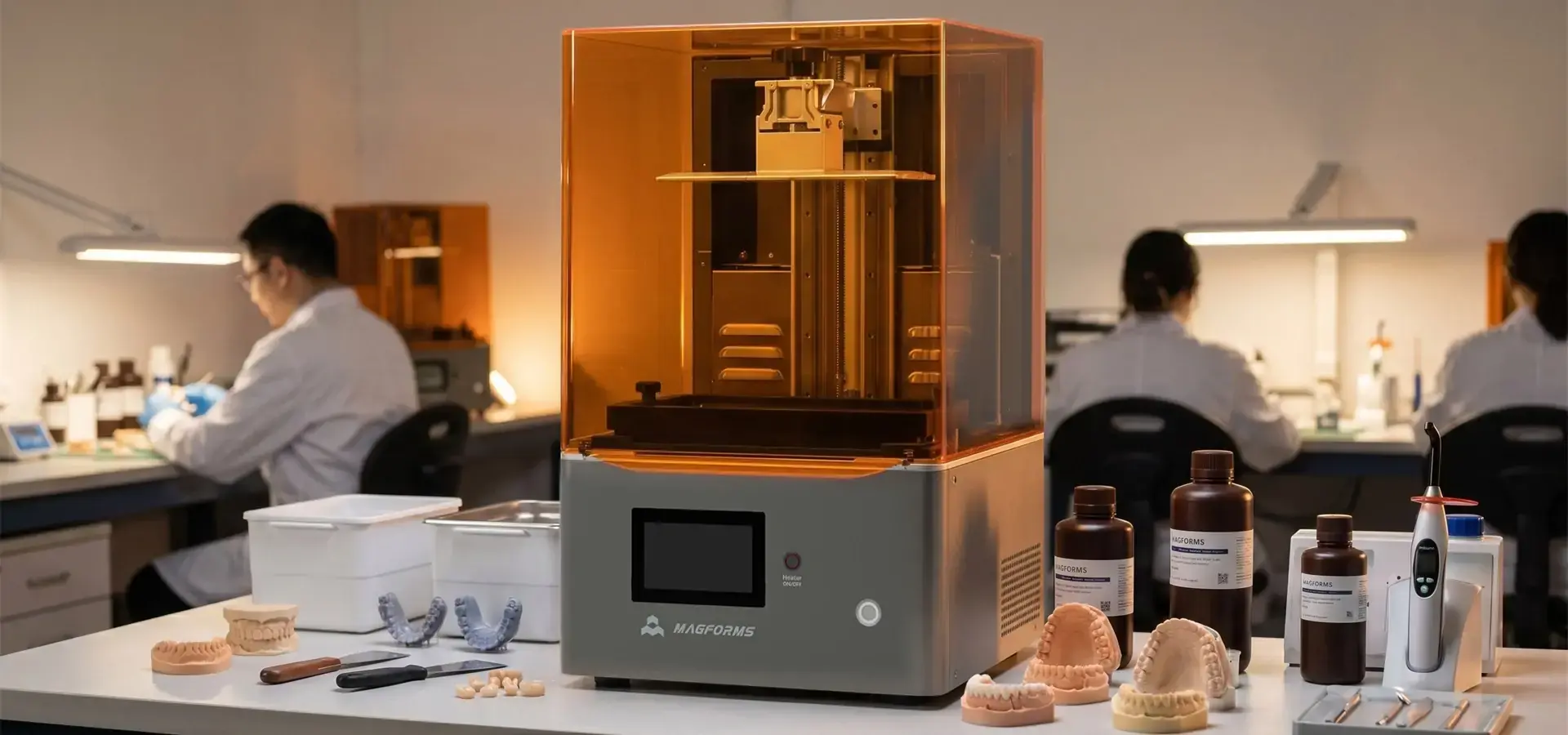
When we discuss rapid prototyping in today's competitive manufacturing landscape, the low cost SLA printer has emerged as a transformative solution. These affordable desktop resin 3D printers typically use LCD-based masked stereolithography (mSLA) technology to create highly detailed models without the high costs traditionally associated with industrial laser-based SLA systems. Unlike traditional laser-based SLA systems that trace each layer point-by-point with galvanometer-controlled lasers, most low-cost SLA printers on today's market actually use mSLA technology, curing entire resin layers simultaneously through a masked LCD screen, reducing hardware costs by over 90% while supporting configurable layer heights between 10 and 50 microns. This change in technology makes it easier for small and medium-sized businesses to create high-quality prototypes, allowing them to design faster, rely less on outside help, and produce items locally in various fields like dental labs and car research and development.
Understanding Low Cost SLA Printers and Their Role in Prototyping
How Stereolithography Technology Works in Budget Models
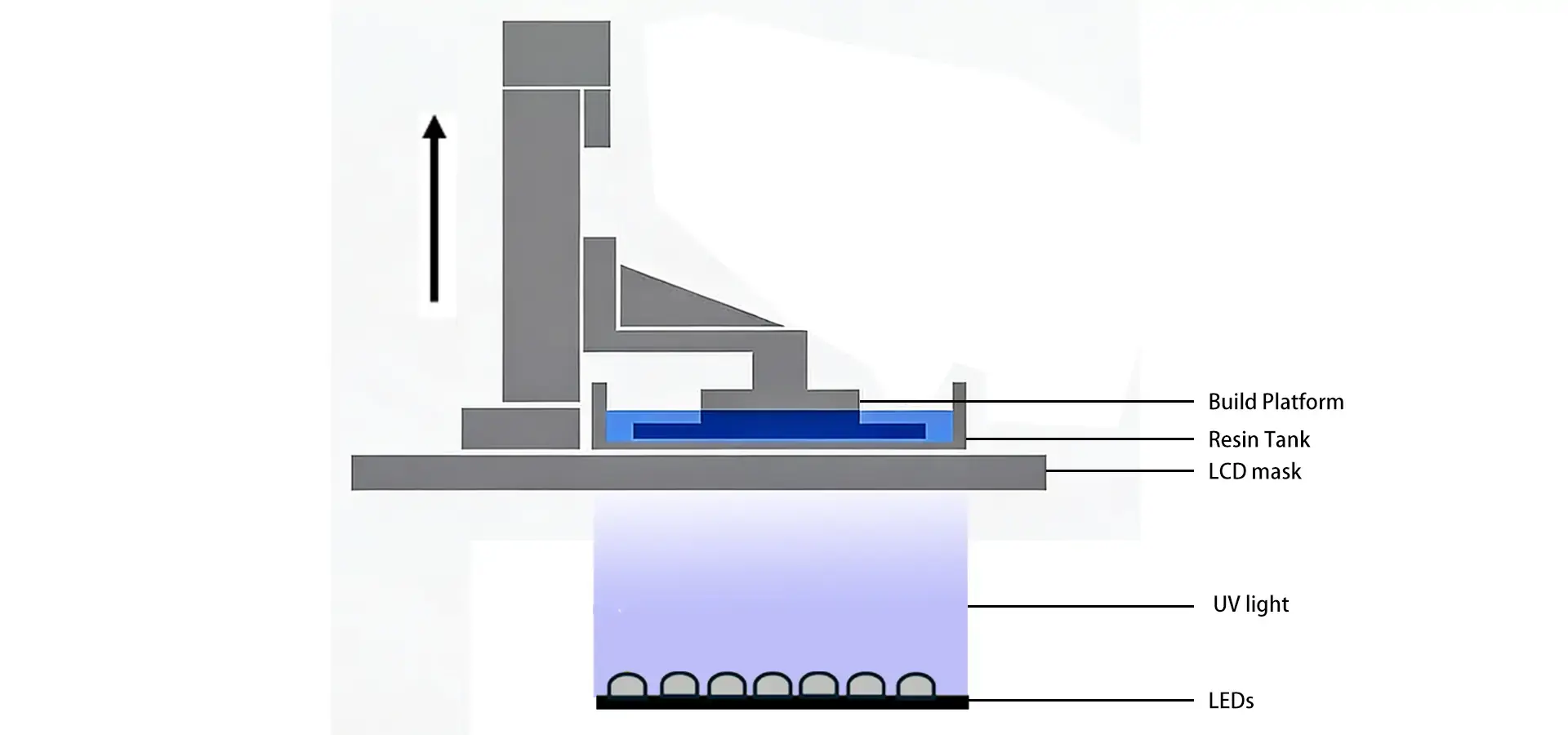
Stereolithography remains one of the most dimensionally accurate polymer-based additive manufacturing technologies available today. A low cost SLA printer works by shining a 405 nm UV light source on liquid photopolymer resin. This causes a photochemical reaction that turns the material into a solid layer by layer. Modern budget-friendly units commonly use monochromatic LCD screens marketed as 4K, 8K, or 16K systems, where the actual XY precision is primarily determined by pixel size and build area dimensions. These screens work as dynamic masks that control light exposure very precisely. This approach differs significantly from industrial laser-based SLA systems, but it still gets XY resolutions of 18 to 50 microns.
At the start of the process, the build platform is placed just micrometers above the bottom of a resin tank and immersed in it. The collection of UV LEDs sends light through the LCD screen and cures a cross-sectional layer of the part. The platform then rises, letting fresh resin flow below. The process then repeats layer by layer until the print is complete. This method produces parts with smooth surfaces and more consistent mechanical properties than typical FDM prints, although resin-based parts can still exhibit some directional variation depending on print orientation and post-curing conditions. This process is different from FDM parts, which can exhibit weaker interlayer bonding under certain load conditions.
Advantages That Make Budget SLA Attractive for Prototyping
We have seen how low-cost SLA printers have changed the way development is done by providing many useful advantages. The surface quality can approach injection-molded appearance for many visual prototypes and presentation models, especially after proper post-processing. This is crucial when making presentation models for clients to approve or working prototypes that need to have tight tolerances for snap-fit parts. Being able to print complicated shapes, including internal channels and undercuts, with minimal visible layer lines and relatively small support contact points opens up design possibilities previously limited to expensive manufacturing methods.
Material compatibility is another major advantage. Third-party resin ecosystems have grown a lot, now giving standard, ABS-like, flexible, water-washable, and specialized formulations like dental-grade, high-temperature, and castable types. This flexibility is very different from proprietary material systems, which force users to buy expensive consumables. When making a lot of the same thing, the productivity advantages of LCD-based mSLA systems become especially noticeable because the curing time depends solely on Z-height and not on how many parts are on the build platform.
Limitations and Trade-Offs to Consider
There are some limits that budget models put on procurement teams that they need to be honest about. The usual build volume is between 120x68x150mm and 192x120x250mm, which is smaller than industrial equivalents. Because of this limitation, part segmentation is needed for bigger units, which makes post-processing more difficult. Even though newer LED arrays and faster lifting mechanisms are improving print speeds, although print speed still varies depending on exposure settings, layer thickness, and optical system design, some industrial DLP systems may outperform entry-level LCD printers in high-throughput applications.
Routine maintenance is essential for stable long-term operation. After a while of use, resin tanks become cloudy, which limits light transmission and lowers the quality of the parts. Even though LCD screens have better lifespans of more than 2,000 hours, they still break down over time and need to be replaced. Because some photopolymer resins can release odors and volatile compounds during printing and post-processing, these machines are best operated in ventilated environments or enclosed systems with air filtration. Post-processing steps, like washing in isopropyl alcohol or special cleaning solutions and UV post-curing, take more time and are generally more labor-intensive than the post-processing workflow associated with many standard FDM applications.
Key Evaluation Criteria for Choosing Low Cost SLA Printers for Prototyping
Defining Your Prototyping Requirements
We suggest that you do an internal needs assessment before looking at specific models. Make it clear what your normal part sizes are, what kind of surface finish you need, what kind of mechanical properties you expect, and how many you want to make. The needs of a dental laboratory printing orthodontic models are very different from those of an automotive team prototyping dashboard components. Budget limits naturally affect choices, but focusing only on the initial cost without taking into account ongoing costs, maintenance schedules, and possible downtime leads to false economies.
Material suitability needs extra attention. Check to see if the printers you're interested in can use open-system resin instead of proprietary formulations. This adaptability keeps running costs low and lets you try out different types of materials as the needs of the project change. Software ecosystems are also important. For example, intuitive slicing software with strong support generation algorithms, hollowing features, and print job management tools has a direct effect on how well operators do their jobs and how many parts they are able to make.
Critical Performance Specifications to Compare
Resolution requirements need to be interpreted in a complex way. The LCD screen's pixel pitch determines the XY resolution, which in turn affects how well small details are shown. The Z-axis layer height affects how smooth the surface is and how long the print takes, and it can be changed on most systems from 10 to 100 microns. For general prototyping, we've found that 25-micron layers offer the best mix of quality and speed. On the other hand, 10-micron settings work best for jewelry casting models and dental tools.
Edge-zone printing failures can be avoided by making the light source constant. Devices that use COB (Chip on Board) LED arrays with Fresnel lens systems or refractive optical elements can achieve high light uniformity across the build platform, helping maintain consistent curing performance and dimensional accuracy. Strong Z-axis rail systems provide mechanical stability. Dual linear rails remove wobble and keep layer registration accuracy, which is important for making sure that functional prototypes are accurate in terms of their dimensions.
Build platform adhesion mechanisms vary between perforated metal plates, textured surfaces, and flexible magnetic build plates. Each approach affects first-layer adhesion reliability and part removal ease. We've found that magnetic systems make it easier for operators to do their jobs and lower the risk of damaging delicate parts while they're being removed, but they do come at a small cost.
Evaluating Brand Reputation and Support Infrastructure
There are a few big players in the low cost SLA printer market, and each has its own strengths. Anycubic has a good image because it is widely used in the community and has a lot of tools for troubleshooting. Creality uses its knowledge of FDM to make SLA units that are competitively priced and work with more and more materials. Elegoo focuses on aggressive prices and user-friendly platforms for new customers.
There are more brands to choose from than just technical specifications. Warranty terms, which usually last between six months and two years, show how confident the manufacturer is in the product. Total cost of ownership is affected by how quickly you can get help with technical issues, how easy it is to get replacement parts, and how easy it is to get software updates. During the review phase, we tell procurement teams to ask for sample prints using their CAD files. These prints show real-world performance better than specification sheets.
Optimizing Performance and Maintenance of Low-Cost SLA Printers
Calibration and Environmental Control Best Practices
Setting up a low-cost SLA printer correctly is the first step to getting consistent results. Leveling the build platform, which is usually done with paper gap measurements, makes sure that the first layer sticks evenly. We suggest re-leveling once a month or whenever there is a mechanical disturbance. The Z-axis zero-point correction changes the accuracy of the dimensions and needs to be adjusted when the resin mixture changes or after long periods of storage.
Environmental factors have a big effect on how well prints do. Ambient operating temperatures should ideally remain between 20°C and 28°C. Below this range, the viscosity of the resin increases, making it harder for it to flow and fill in layers incompletely. When humidity levels are higher than 70%, water can get into hygroscopic resins and cause bubbles and other problems on the surface. These factors can be lessened by doing simple things like putting the printer in a temperature-controlled box or putting dehumidifiers in production areas.
Handling rules for resin keep it from getting dirty and make it last longer. When you filter resin after a print fails, you get rid of the partially cured bits that cause new problems. Keeping bottles in dark places away from light stops polymerization from happening too soon. Thoroughly mixing the resin before each session makes sure that the pigment is spread out and that the curing qualities stay the same. This is especially important for custom recipes that contain functional fillers.
Routine Maintenance Schedules to Prevent Failures
We've developed maintenance protocols that minimize unplanned downtime as much as possible. Clean the resin tank with isopropyl alcohol and microfiber cloths every 20 hours. Look for scratches or cloudiness that make it hard for light to pass through. If the FEP (fluorinated ethylene propylene) film or NFEP (non-fluorinated ethylene propylene) release layer starts to peel or when surface defects appear on printed parts, replacement intervals vary depending on resin type, print frequency, exposure settings, and peel forces, but damaged or cloudy films should be replaced immediately to maintain print quality.
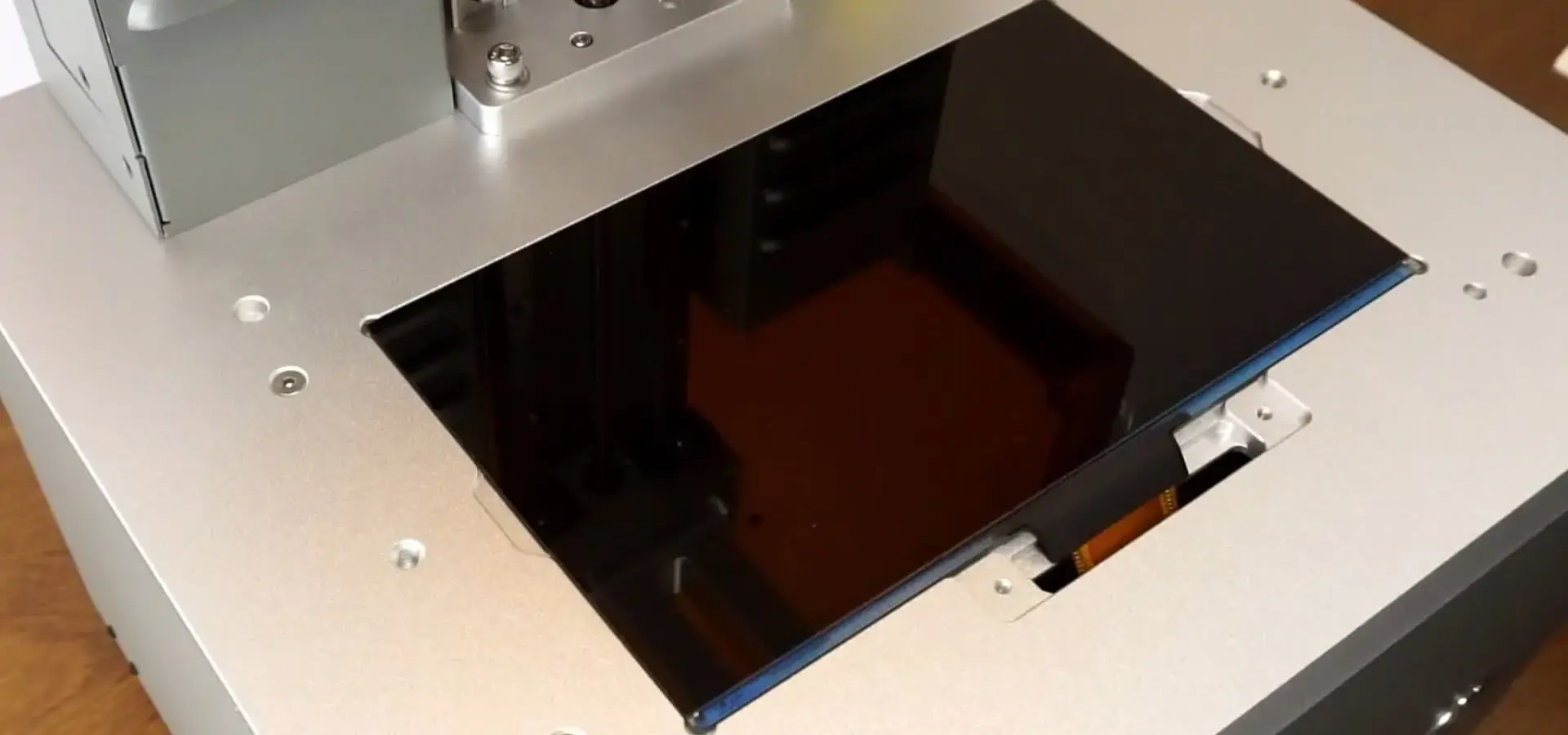
Testing the printer's built-in features or external light meters on a regular basis for light uniformity is part of keeping an eye on the health of an LCD screen. Dimming or odd lighting patterns are signs that something is about to break, so you can replace it before the print quality gets worse. UV LED arrays don't need much upkeep, but the protective glass should be looked at visually for dust buildup, which lowers the output intensity.
After hundreds of prints, the build platform surface needs to be resurfaced because parts being taken off over and over again scratch it. Using 400-grit sandpaper for light sanding brings back the texture, which makes the first layer stick better. Every 100 hours of use, PTFE-based grease should be put on the Z-axis linear rails to keep them moving smoothly and reduce mechanical noise, which also makes the components last longer.
Material Selection Strategies for Different Applications
The resin ecosystem has formulations that can be used for different kinds of prototyping. Standard resins, which have tensile strengths of 40 to 50 MPa, are economical and can be used for concept models and fit testing. ABS-like resins make things tougher and less likely to break when they hit something. They are good for testing the mechanical strength of functional samples. Prototyping of gaskets, seals, and wearable tech is possible with flexible materials that have shore hardness grades between 40A and 95A.
Specialty formulations are used for specific tasks. When investment casting, castable resins burn off easily, leaving no ash behind for making jewelry and dental crowns. High-temperature resins keep their shape above 200°C, which is very important for validating automotive parts under the hood. When properly post-cured and polished, transparent resins can achieve high visual clarity after sanding, polishing, and optimized post-curing, making them suitable for concept lenses and fluid-flow visualization models.
We suggest keeping three types of resin in stock: a basic formulation that can be used for everyday prototyping, an engineering-grade tough resin for functional testing, and a specialty resin that fits the needs of your industry. This method strikes a good balance between versatility and ease of inventory management, and it keeps you from throwing away materials that have expired.

Procurement Channels and Brand Insights for Low-Cost SLA Printers
Navigating B2B Sourcing Options
There are several ways for B2B procurement teams to get low-cost SLA printers, and each has its own benefits. For volume purchases, direct manufacturer relationships offer the best prices, but you usually need to order at least three to ten units at a time. We've been able to get bulk discounts of more than 20%, as well as longer warranty terms and priority technical support access. Manufacturer-direct sourcing ensures genuine components and firmware updates, reducing counterfeit risks prevalent in some consumer channels.
Authorized distributors serve regional markets with localized inventory. This cuts down on shipping times and the complexities of importing. These partners often offer training workshops, on-site installation, and maintenance contracts all in one package, which is helpful for teams that are new to SLA technology. Distribution markups are usually between 10% and 25%, which is justified by value-added services and rapid replacement part availability.
Online B2B marketplaces bring together many brands, letting you compare products based on their specifications. Platforms that focus on industrial tools offer ways for buyers to protect themselves, reviews of verified suppliers, and escrow payment choices. We want to warn you that the cheapest items on the market are sometimes gray-market imports that don't come with warranties or support materials that are written in the language of the buyer.
Warranty, Support, and Service Level Agreements
Budget SLA systems usually come with a six- to twelve-month warranty that covers manufacturing defects in both mechanical and electronic components. Since LCD screens and FEP films are consumable items, they usually come with shorter warranties or guarantees based on usage (for example, 500 hours of operation). For an extra 8 to 15 percent of the purchase price, you can get an extended warranty that covers twice as long and may include allowances for consumables.
How quickly technical support responds varies a lot between brands. Tier-one manufacturers have support teams that speak more than one language and promise to respond to critical problems in less than 24 hours. For smaller companies, community forums and email-only support with resolution times of several days may be common. We suggest checking to see if support is available during your business hours. This is especially important for teams that work in different time zones from the manufacturer's headquarters.
Service level agreements (SLAs) tailored for B2B clients formalize support commitments by listing maximum response times, shipping schedules for replacement parts, and on-site service availability. Even though these agreements raise the cost of equipment by 5 to 10 percent a year, they are very useful in production settings where printer downtime directly affects revenue. When you negotiate SLAs during the initial procurement process, you get better terms than when you add service after the purchase.
Evaluating Total Cost of Ownership Beyond Sticker Price
The purchase price only makes up 30% to 40% of the total cost of ownership over five years. The costs of consumables like resin, FEP films, and LCD screens add up quickly. About 20 liters of resin ($600 to $1,200 based on formulation), two LCD screens ($100 to $200 each), and four FEP films ($40 to $80 total) are used by a facility that prints for 500 hours a year. Maintenance items like gloves, isopropyl alcohol, and filters add small but ongoing costs.
An often-overlooked operational cost is labor. Operators spend time getting ready for pre-print, post-processing, and maintenance. Assuming that setting up a print job takes 15 minutes and washing and curing each batch takes 45 minutes, a facility that does 500 jobs a year invests 500 hours in labor. At wage rates of $25/hour, this adds up to $12,500, which could be more than the printer's original price.
Energy use is still very low; most units only use 60 to 150 watts when they're working. But things like ventilation systems, curing stations, and washing machines that are needed for the facility cost between $500 and $2,000. We recommend doing a full TCO analysis that looks at five years and takes into account replacement cycles, efficiency gains from less outsourcing, and the potential costs of other technologies. This analysis provides a more realistic understanding of long-term operating costs.
Conclusion
Low-cost SLA printers have significantly expanded access to high-precision resin prototyping for small businesses, design studios, and engineering teams. Throughout this guide, we've explored how masked stereolithography delivers exceptional surface quality and dimensional accuracy, compared the technology against FDM and DLP alternatives, and outlined critical evaluation criteria for procurement decisions. Success with these systems requires understanding both their capabilities and limitations—from material compatibility and maintenance demands to total cost of ownership calculations that extend beyond the purchase price. As the technology continues maturing with improved LCD lifespans, faster printing speeds, and expanding resin ecosystems, low-cost SLA printers will increasingly replace outsourced prototyping services, shortening product development cycles and enhancing design iteration agility across industries.
FAQ
How Long Do Low-Cost SLA Printers Last Under Intensive Use?
Depending on maintenance quality, operating conditions, and component durability, many low-cost LCD resin printers can remain operational for several thousand printing hours before requiring major component replacement. This is as long as it is cleaned regularly and consumables are replaced when they run out. Since the LCD screen is the part that wears out the fastest, it usually needs to be replaced every 1,500 to 2,500 hours, though this depends on how much UV light is hitting it and what kind of resin formulation was used. If you keep mechanical parts like Z-axis motors and linear rails well-oiled, they will often last longer than the printer's economic useful life. We tracked units in dental laboratories that were used for more than 6,000 hours over four years and only needed consumable repairs, demonstrating that intensive use doesn't preclude longevity when maintenance protocols are followed diligently.
Can These Printers Handle Large Parts or Only Small Components?
The largest single piece that can be made is limited by the build space. Most budget models can only fit parts that are between 120x68x150mm and 192x120x250mm. For bigger samples, they need to be segmented into several pieces that are then put together using mechanical fasteners or adhesive bonding after printing. This approach actually has benefits, as it allows hollow construction, which uses less material, and makes it easier to get to features inside parts that aren't made of one solid piece. We've helped automakers print dashboard kits in seven separate parts that fit together perfectly, validating fit and finish before committing to injection mold tooling. With strategic part orientation and segmentation planning, limitations on the build volume can be turned into opportunities for optimized designs.
What Maintenance Tasks Are Required to Keep Printers Running Reliably?
Every 20 hours of use, the resin tank needs to be cleaned with isopropyl alcohol. FEP films should be inspected regularly for scratches, clouding, or deformation and replaced whenever print quality begins to decline, and the Z-axis rails need to be lubricated every three months. Leveling the build platform once a month makes sure that the first layer sticks consistently, and checking the uniformity of the LCD screen on a regular basis finds problems before the print quality gets worse. Together, these tasks take about two hours a month for a system that isn't overworked. Magforms gives operators thorough maintenance schedules and video tutorials that help them do these tasks with confidence, minimizing reliance on external service technicians and maximizing uptime for your production workflows.
Magforms: Your Partner in Advanced Prototyping Solutions
Navigating the low-cost SLA printer market requires more than comparing specification sheets—it demands a partner who understands your production challenges and growth ambitions. Magforms brings over a decade of additive manufacturing expertise, serving more than 300 enterprises across aerospace, automotive, medical, and consumer electronics sectors. Our integrated approach combines proprietary LCD-based resin printing systems with precisely engineered photopolymer formulations, eliminating the compatibility issues that plague mixed-vendor workflows. By deeply optimizing materials and hardware together, we achieve printing speeds 30% faster than industry averages while maintaining micron-level accuracy that meets the strictest quality standards in dental prosthetics and precision tooling applications.
We've invested in building a truly responsive support infrastructure because we know that in production environments, downtime means lost revenue. Our technical team responds to inquiries within hours, not days, and our comprehensive training programs ensure your operators maximize equipment performance from day one. Whether you're a startup design studio seeking your first low-cost SLA printer for sale or a mid-sized manufacturer scaling production capacity, our application engineers work directly with you to configure systems that address your specific prototyping workflows. Contact us at info@magforms.com to discuss volume pricing, request sample prints using your CAD files, or arrange a demonstration at our facility. We're ready to transform your prototyping capabilities with proven technology backed by a genuine partnership.
References
1. Gibson, I., Rosen, D., & Stucker, B. (2021). Additive Manufacturing Technologies: 3D Printing, Rapid Prototyping, and Direct Digital Manufacturing. Springer International Publishing.
2. Grimm, T. (2019). The Strategic Importance of Additive Manufacturing in Modern Product Development. Journal of Manufacturing Science and Engineering, 141(8), 081002.
3. Jacobs, P. F. (2020). Stereolithography and Other RP&M Technologies: From Rapid Prototyping to Rapid Tooling. Society of Manufacturing Engineers.
4. Ligon, S. C., Liska, R., Stampfl, J., Gurr, M., & Mülhaupt, R. (2017). Polymers for 3D Printing and Customized Additive Manufacturing. Chemical Reviews, 117(15), 10212-10290.
5. Stansbury, J. W., & Idacavage, M. J. (2016). 3D Printing with Polymers: Challenges Among Expanding Options and Opportunities. Dental Materials, 32(1), 54-64.
6. Wohlers, T., Campbell, R. I., Diegel, O., Kowen, J., & Mostow, N. (2022). Wohlers Report 2022: 3D Printing and Additive Manufacturing Global State of the Industry. Wohlers Associates Inc.


Magforms makes design and manufacture easier.
Popular Blogs
-
 Industry InsightsManufacturing Industry
FDM vs. SLA Printer: Which Technology Is Right for Your Project?
-
 Industry InsightsManufacturing Industry
Top 5 Applications of Industrial 3D Printers in Manufacturing Today
-
 Industry InsightsManufacturing Industry
Why Stereolithography 3D Printers Are Unmatched for Microfluidic Device Prototyping?
