What Features Make a Budget SLA Printer Ideal for Beginners?
A budget SLA printer stands out as an easy-to-use but powerful way to get started with professional additive manufacturing. These machines use masked stereolithography (mSLA) technology, which employs 405nm UV light to cure photosensitive resin layer by layer through a high-resolution monochrome LCD screen. In contrast to traditional laser-based SLA systems are expensive, while newer LCD-based versions offer micron-level XY resolution, usually between 22 and 50 microns, at prices accessible to small design studios, dental labs, and emerging service providers. Because they are cheap and can reproduce professional-level details, these are perfect for companies that want to start precision prototyping without sacrificing the quality of the surface finish or the accuracy of measurements.
Understanding Budget SLA Printers for Beginners
How MSLA Technology Simplifies Resin Printing
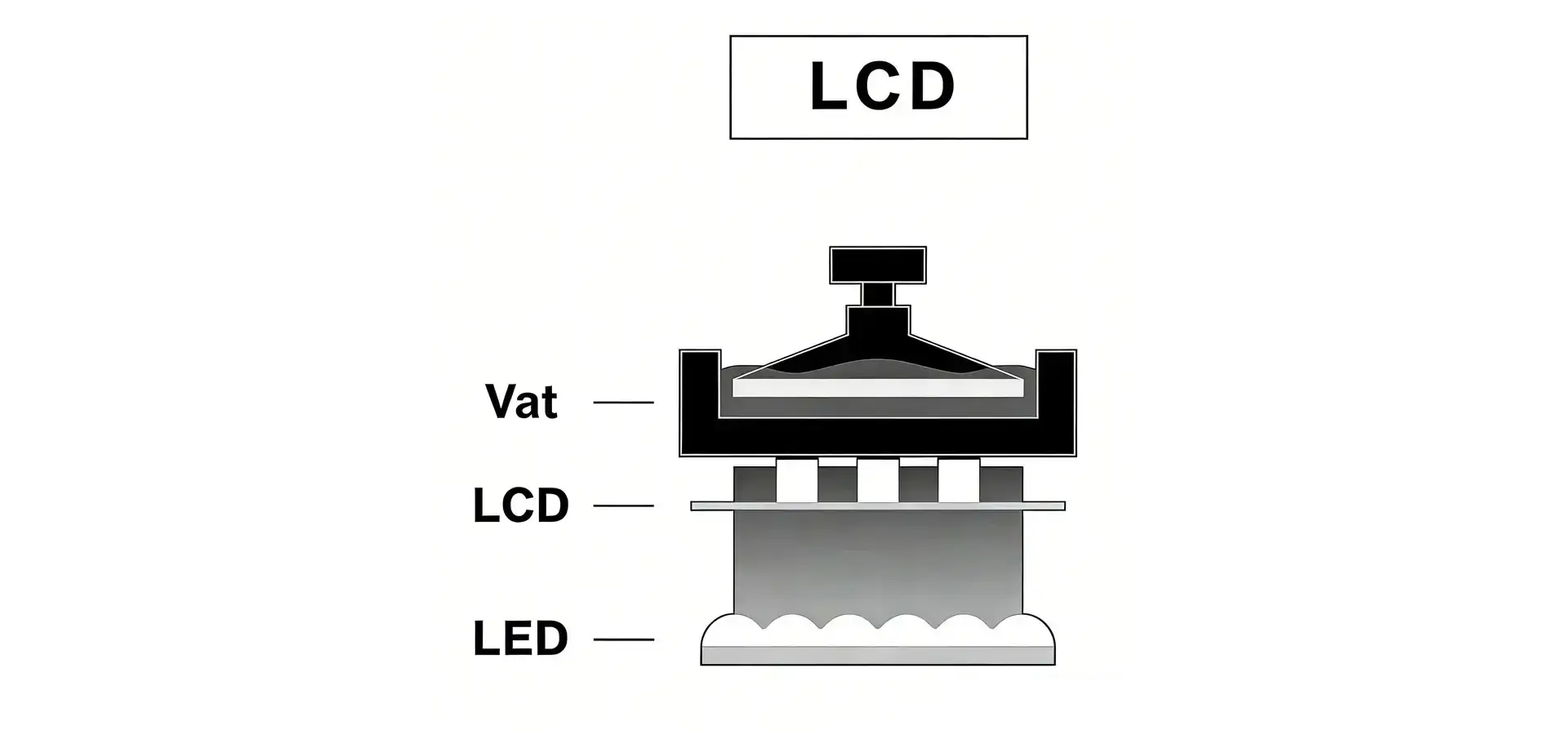
Budget SLA printers mostly use MSLA design, which gets rid of the need for complex optical correction systems that are common in industrial laser-based equipment. A build platform is lowered into a vat of liquid photopolymer resin, and each layer is exposed to UV light evenly through a blocked LCD panel. This is the main process. Compared to galvo-driven laser SLA systems (which use galvanometer mirrors to steer the laser beam), this mask-based parallel curing method reduces mechanical complexity, enabling more stable and cost-effective systems. Modern models use monochrome LCD panels that can cure in 1 to 3 seconds per layer, which is a huge improvement over older RGB screens that needed 8 to 12 seconds per layer.
Distinguishing MSLA from DLP and Traditional SLA
The word "SLA" was first used to refer to laser-based stereolithography, but LCD masking technology is now mostly used in the budget market. Digital Light Processing (DLP) systems project whole layers using digital micromirrors. They offer slightly faster speeds but usually come with higher costs for the equipment. LCD-based budget SLA printers have the same quality as other models, but they are easier to maintain because the LCD screen only needs to be changed every 2,000 to 3,000 printing hours. High-end laser SLA systems are still used in industrial applications and typically require capital expenditures exceeding $15,000, making them less accessible for small-scale prototyping. This means that businesses that are testing the market or taking on small special orders can't use them.
Essential Features That Make Budget SLA Printers Beginner-Friendly
Intuitive User Interfaces and Software Compatibility
When equipment is easy to use, the learning curve for additive manufacturing reduces by a large amount. Modern budget SLA printers have color touchscreens that show the print job's progress, its expected end time, and warnings about the resin level. Industry-standard slicing platforms like ChiTuBox and Lychee Slicer are fully compatible with the software. These platforms offer visual support, generation tools, and one-click parameter change. This cross-platform freedom lets technical teams use processes they already know instead of having to learn new proprietary systems. This speeds up operator skill and lowers the cost of training for companies that are hiring a lot of people.
Print Resolution and Surface Quality Standards
Professional prototyping requires precise dimensional accuracy and high-quality surface finish, which makes budget SLA printers valuable compared to traditional subtractive manufacturing methods. Budget SLA printers with 9K black-and-white LCD screens have an XY resolution of about 35 microns, which is good enough for dental models, jewelry casting patterns, and electronics housings that need to correctly copy small details like screw holes and texture patterns. The layer height control is usually between 10 and 100 microns, with 25 to 50 micron sets that balance the need for speed and surface finish. This level of resolution lets buying teams combine different prototyping needs into a single group of tools, instead of keeping separate systems for each level of accuracy.
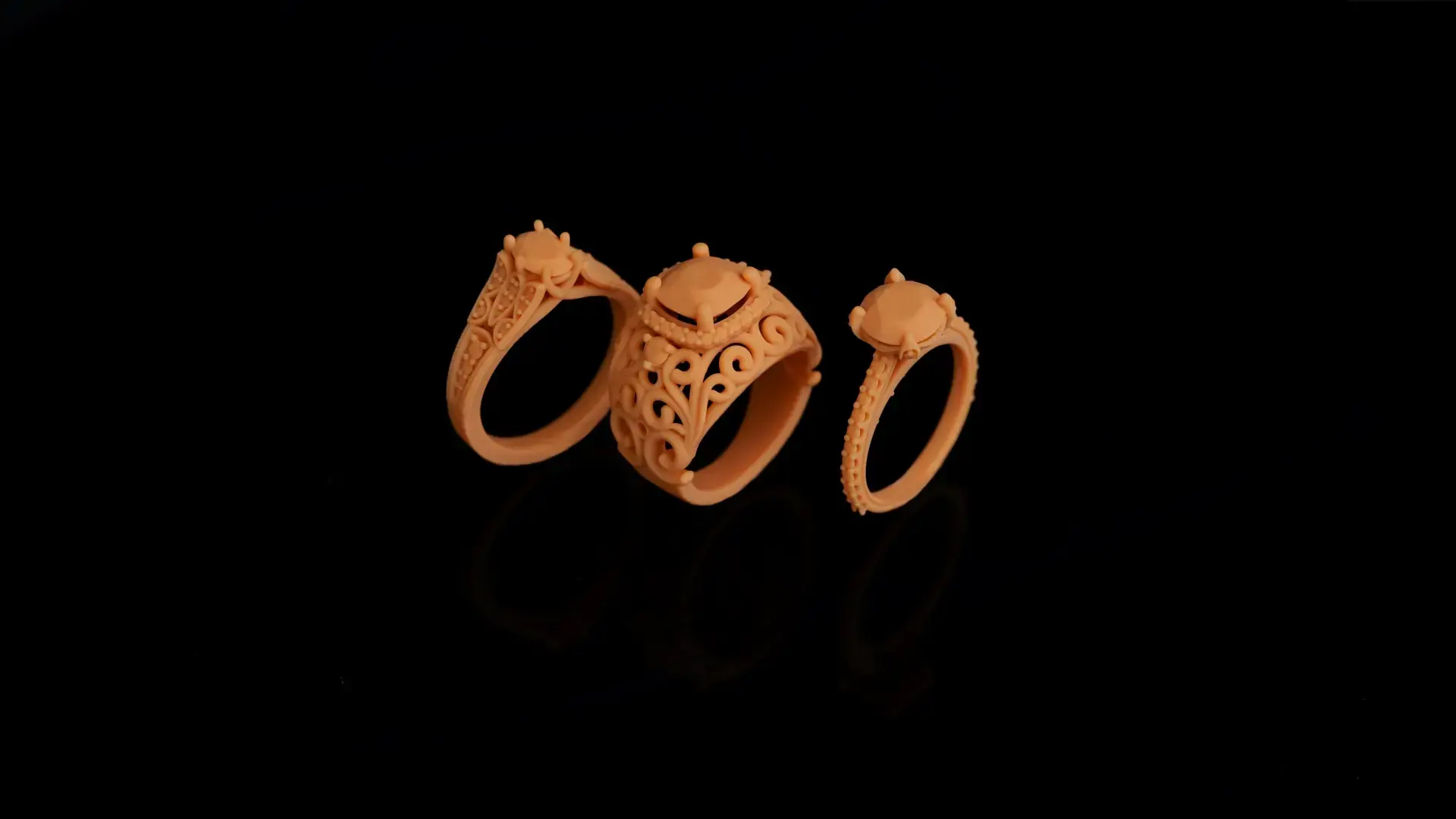
Build Volume and Production Throughput
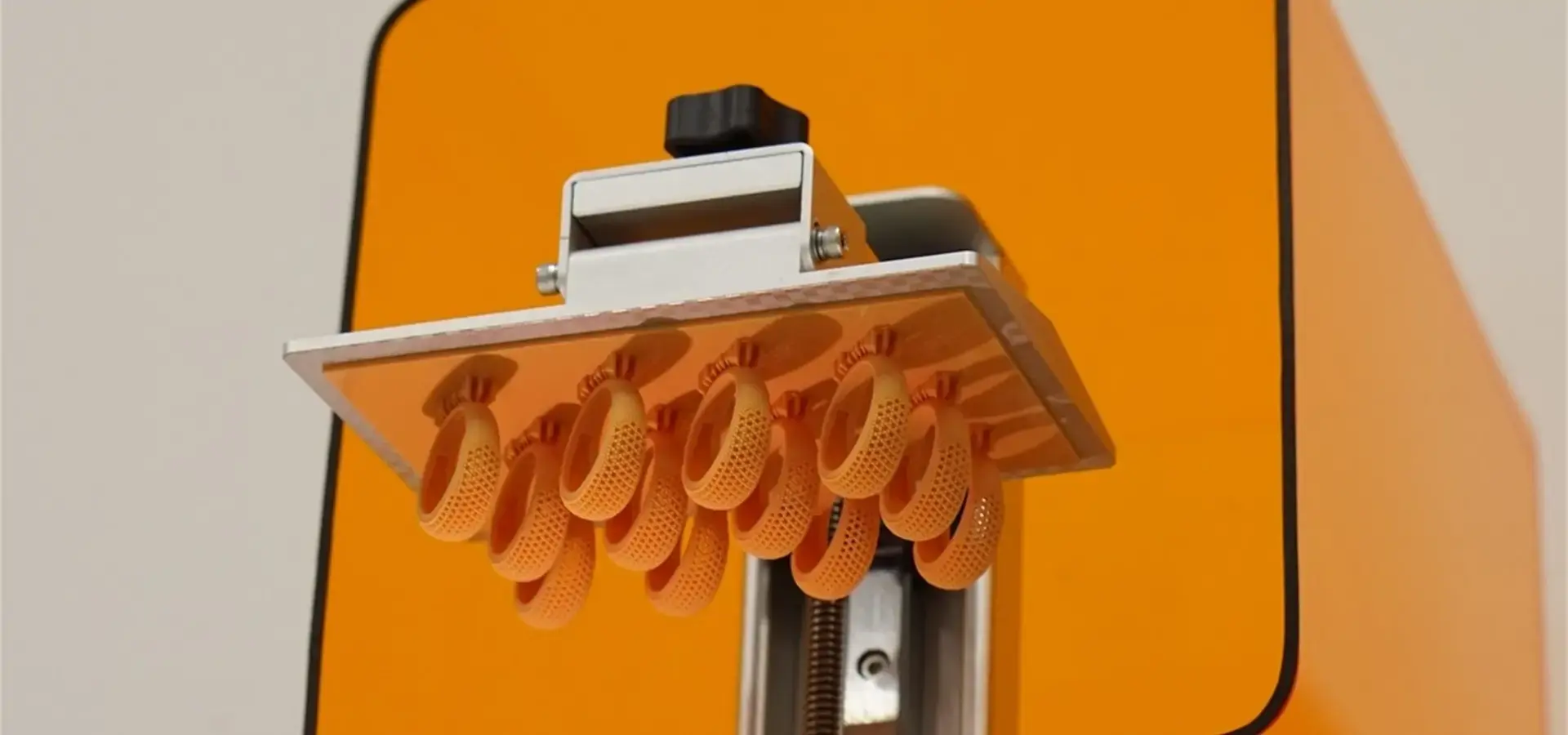
To find a good balance between the size of the room and the budget, you need to carefully look at the build envelope specs. Budget SLA printers for beginners usually have build sizes between 120x68x150mm and 192x120x250mm, which is large enough for most small-batch development and custom part production. Larger platforms let you print many parts at once, which lowers the cost per part by spreading out the time needed for setup and processing. Because mSLA technology cures entire layers simultaneously, print time primarily depends on Z-height, rather than the number of parts on the build plate. This lets workers make the most of the platform without losing time, which is very important for service providers who are working on multiple orders at the same time.
How to Choose the Best Budget SLA Printer for Beginners: A Decision Support Framework
Defining Production Requirements and Budget Constraints
Before making a purchase choice, it's important to know how much expected monthly output, minimum resolution needs, and available capital allocation are. Companies that make 50 to 100 prototypes a month need different throughput skills than companies that make 10 to 15 special dental models a week. By setting these factors, you can tell if a small budget SLA printer with a 120mm build height is enough or if operations call for mid-format systems with 200mm+ of vertical space for taller parts. Budgets usually range from $400 for basic units that can be used for trying their capabilities for the first time to $1,500 for platforms with lots of features like dual linear rails, 8K resolution, and multiple advanced connecting options.
Evaluating Core Selection Criteria
There are three main things that people look for in equipment: consistent print quality, software ecosystem compatibility, and easy access to after-sales support. For dental applications where fit tolerance affects patient results, it is essential that budget SLA printer models show light uniformity exceeding 90% across the build plate to avoid edge delamination and guarantee dimensional consistency from center to edge. Dual linear rail Z-axis design gets rid of wobble effects that lower the quality of the vertical surface, which is what sets professional-grade budget systems apart from entry-level ones.
Software usage for budget SLA printers includes both how easy it is to use the slicing tool and how stable the firmware is. Systems that allow USB connectivity, Wi-Fi file sharing, and cloud-based print queue management make it easier for settings with more than one operator to do their jobs. When a maker responds to technical questions, makes new parts available, and offers calibration help when users switch between resin formulas, this is a sign of good after-sales support.
Practical Tips for Maintaining and Optimizing Your Budget SLA Printer
Routine Maintenance Protocols
To get the most out of your budget SLA printer, you need to stick to simple repair plans. To keep the screen from getting damaged between prints, use a plastic scraper to remove any hardened resin pieces from the vat. Before putting the plastic back into the pot, strain it through a 200-micron filter to get rid of any impurities that could cause print problems. Clean the build platform with IPA alcohol and use 150-grit sandpaper to make the surface slightly rougher every 30 to 40 prints to keep the binding properties. Check the FEP film once a week for cloudiness or holes; replacing damaged films stops print failures caused by suction and keeps the screen's integrity.
The monochrome LCD screen lasts between 2,000 and 3,000 writing hours, which is about 12 to 18 months of average use. Print calibration test patterns once a month to keep an eye on the screen's performance, and replace the screen if exposure problems or dead pixels show up. This part is replaceable and costs $40 to $60. It only takes 15 minutes to install without any special tools.
Troubleshooting Common Technical Issues
Layer binding problems are usually caused by not exposing the bottom layer enough or not setting the build plate correctly. Increasing the Bottom Layer Exposure Time from 30 seconds to 40 to 50 seconds helps the bonding of the first layer, especially when working in cold temperatures below 20°C, where the viscosity of the resin rises. To make sure the build plate is level, do the paper test. The platform is said to be zeroed when a piece of paper feels a little drag between the plate and the screen.
Inconsistencies in the drying of resin show up as soft spots or not enough solidification. This problem usually happens because the resin has gone bad (photopolymer resins degrade after 12 to 18 months), the LCD screen is old, the UV strength isn't strong enough, or the exposure settings are wrong for the material formulation. Check the manufacturer's datasheets for the best exposure settings. Change the Normal Layer Exposure by 0.5 seconds at a time until the test prints are the right hardness.
To improve print speed, you need to find the right balance between the lift speed, the return distance, and the light-off delay. Budget SLA printers that use nFEP films can handle faster lift speeds (up to 240 mm/min), compared to standard FEP films (typically 120–180 mm/min). Cutting down on extra safety gaps in these areas can cut the total print time by 15 to 25 percent without affecting quality.
Why Trust Budget SLA Printer Brands: What B2B Buyers Should Know
Evaluating Manufacturer Reputation
Purchasing choices are less risky when they are made with makers who have a history of success. Budget SLA printer makers with a good reputation stay in the market for more than one year, post clear technical specs, and offer customer examples from the dentistry, jewelry, and prototyping industries. Companies like Magforms set a good example by having patent files that cover 22 innovations and brand licenses that protect 30 proprietary technologies. This shows that they keep investing in research and development (R&D) instead of just reselling generic equipment.
Another sign of trust is a company's global market reach. Companies that sell to dozens of countries and work with more than 300 businesses show that they can meet a wide range of regulatory requirements and customer standards. Going to industry shows in Europe, Asia, and North America shows that you care about educating the market and getting to know your customers on a deeper level than just making sales.
Warranty Coverage and Service Accessibility
Comprehensive guarantee terms that last between 12 and 24 months protect capital investments against flaws in the manufacturing process and early failure of parts. The LCD screen, UV light array, stepper motors, and control boards should all be specifically covered by budget SLA printer guarantees. Service accessibility means that the manufacturer can answer technical questions, usually by email, help with promises of a reaction within 24 hours, and by phone during business hours.
Regional service access is very important for businesses that don't have their own professional staff. Authorized service centers or technical partners that are located in the buyer's area allow for quick replacement of parts and on-site troubleshooting when online help isn't enough. This infrastructure cuts down on downtime from days to hours, which helps keep production plans for sample deliveries that need to happen quickly.
Conclusion
To choose the right budget SLA printer, you have to weigh your needs for resolution, output volume, material compatibility, and support infrastructure against the money you have available and your operating knowledge. Modern mSLA technology offers professional-level accuracy at price points accessible to small studios and SMEs. This enables in-house prototyping for industries such as dental labs and automotive design studios. Key selection factors include LCD resolution, build volume, resin system compatibility, and support infrastructure. By carefully looking at these factors and making sure they match up with specific operational needs, buying teams can find the best tools for the best price, with the lowest possible implementation risks and ongoing operational costs.
FAQ
1. What is the expected lifespan of the LCD screen in a Budget SLA printer?
Modern monochrome LCD screens that come with Budget SLA printers usually last for 2,000 to 3,000 printing hours before they need to be replaced. This means that they should last for 12 to 18 months under normal production conditions. The older version had RGB screens that only lasted 500 hours. The screen is a reusable part that breaks down in UV light. Depending on the size and quality, a new screen can cost anywhere from $40 to $60.
2. How does ambient temperature affect printing performance?
Photopolymer resin viscosity is highly sensitive to temperature, and it works best between 20°C and 30°C (68°F and 86°F). Below this point, higher viscosity makes it harder for the resin to flow properly when the layers are being separated, which can lead to delamination or the loss of small details. When working in cooler places, many operators use heated enclosures or resin vat warmers to keep the material's qualities stable during long print processes.
3. Can I use third-party resins with my Budget SLA printer?
Budget SLA printers typically function as open-system platforms that can use any 405nm reactive resin, removing the need for lock-in to a specific material. To get good bonding and fine reproduction, users have to adjust the exposure settings (specifically the Bottom Exposure Time and Normal Layer Exposure parameters) for each resin recipe. The slicing program saves these settings, which lets you switch between materials without having to do any extra calibration work.
4. What distinguishes FEP, nFEP, and ACF release films?
These clear films cover the bottom of the vat and keep the healed layers from touching the screen surface. Standard FEP (Fluorinated Ethylene Propylene) films offer baseline performance. Peel forces can be reduced by ~30% using nFEP (nano-coated PFA) films, which facilitates printing fine features. ACF (Anti-stick Coating Film) is a newer technology that lets you lift at faster speeds (up to 300 mm/min) thanks to better release properties. This cuts the total print time by 20–30% compared to normal FEP.
Partner with Magforms for Reliable Budget SLA Printer Solutions
Magforms is a reliable budget SLA printer provider that combines cutting-edge technology with a full customer service network. Our machines use special materials and tools that have been deeply optimized to work together. This gets rid of the compatibility problems that come up with third-party material combinations and cause measurements to be off and unplanned downtime. Exposure pattern optimization on monochrome LCD panels can improve print efficiency by up to 30% compared to standard configurations. This precision ensures micron-level accuracy suitable for dental models, jewelry patterns, and small-scale precision components, while acknowledging that high-end aerospace or medical devices typically require industrial SLA or DLP systems.
Magforms has 22 patents and 30 registered trademarks, and its equipment has been used continuously for thousands of hours to prove its dependability. Our expert support team provides thorough training, quick responses to questions, and easy-to-reach maintenance advice to make sure your production doesn't stop. Our combined material-equipment options give your projects the stability and performance they need, whether you're setting up your first prototyping capacity or expanding your current operations. Email our experts at info@magforms.com to talk about how our budget SLA printer technology can help your manufacturing processes and get unique suggestions that fit your budget and business needs.
References
1. Gibson, I., Rosen, D., & Stucker, B. (2021). Additive Manufacturing Technologies: 3D Printing, Rapid Prototyping, and Direct Digital Manufacturing (3rd ed.). Springer.
2. Jacobs, P. F. (2020). Stereolithography and Other RP&M Technologies: From Rapid Prototyping to Rapid Manufacturing. Society of Manufacturing Engineers.
3. Ligon, S. C., Liska, R., Stampfl, J., Gurr, M., & Mülhaupt, R. (2017). Polymers for 3D Printing and Customized Additive Manufacturing. Chemical Reviews, 117(15), 10212-10290.
4. Stansbury, J. W., & Idacavage, M. J. (2016). 3D Printing with Polymers: Challenges among Expanding Options and Opportunities. Dental Materials, 32(1), 54-64.
5. Varghese, G., Moral, M., Castro-García, M., López-López, J. J., Marín-Rueda, J. R., Yagüe-Alcaraz, V., & Hernández-Afonso, L. (2023). Comparative Study of MSLA 3D Printers for Dental Applications. Materials, 16(4), 1669.
6. Wohlers, T., Campbell, I., Diegel, O., Kowen, J., & Mostow, N. (2023). Wohlers Report 2023: 3D Printing and Additive Manufacturing Global State of the Industry. Wohlers Associates.


Magforms makes design and manufacture easier.
Popular Blogs
-
 Industry InsightsManufacturing Industry
FDM vs. SLA Printer: Which Technology Is Right for Your Project?
-
 Industry InsightsManufacturing Industry
Top 5 Applications of Industrial 3D Printers in Manufacturing Today
-
 Industry InsightsManufacturing Industry
Why Stereolithography 3D Printers Are Unmatched for Microfluidic Device Prototyping?
